Templates, import and export
A workflow is data, so it can travel: start one from a template, describe it in a sentence, download one as a file, load that file into another install, or seed it from code. Everything on this page produces an inactive workflow that opens with the nodes still to fill in marked, so nothing runs before you have looked at it.
Templates
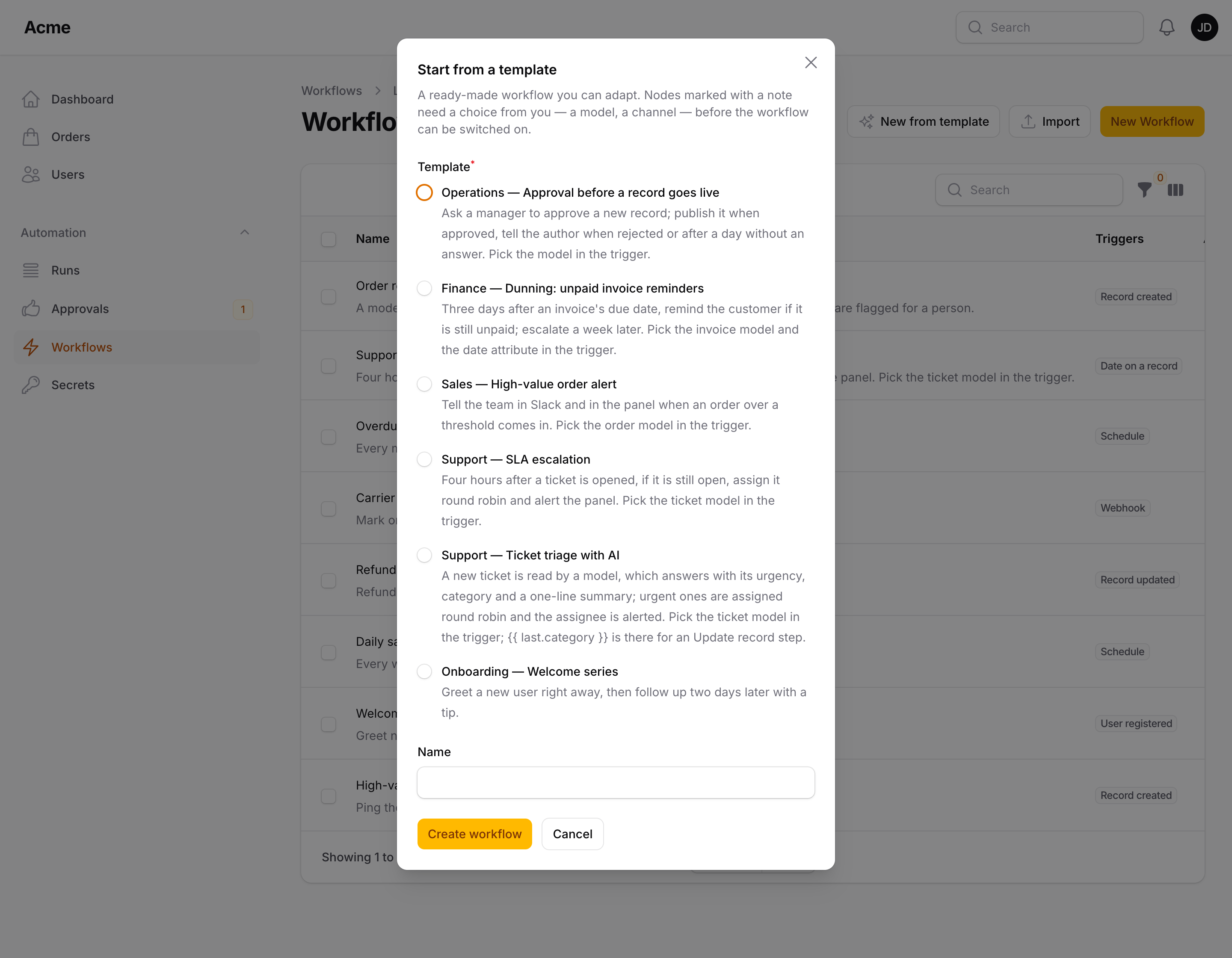
Every workflow starts from New workflow on the Workflows page. It opens the create page, which asks How do you want to start?: Blank canvas, Template, Describe it (with packstub/agents installed) or Import. The page is one card: the name, the description and the collapsed Run settings on top, then the ways to start; pick one and only its fields show below it. The name is required only for a blank canvas: for the other ways its placeholder shows the name the workflow will get, and whatever you fill in wins over the template's or the document's. While the Workflows table is empty, it offers each way to start as its own button, opening the create page with that one picked.
Template lists the ready-made workflows beside a preview of the picked one (the first is picked for you). Each row gives the name, the area, the number of steps and a dot per step coloured like the nodes (trigger, condition, action, AI); while more than one area is offered, filters above the list narrow it to one, and from eight templates on a search box looks in the names, areas, descriptions and steps. The preview draws the workflow from its definition, every node where it sits on the canvas, with its description underneath and You will fill in: the settings the template leaves for you and the node each sits on, marked with a red dot on the diagram too. Full screen gives the diagram the whole window. Create workflow opens it on the canvas with a red badge on every node that needs a choice from you — the record type of a trigger, the agents of a round-robin assignment — and a note in the node's description; the workflow cannot be switched on until they are filled, exactly like any other incomplete draft (see Building workflows).
To link straight to a template — from a dashboard, an onboarding checklist, your own docs — add ?template=<key> to the create page's URL (the built-in keys are welcome-series, high-value-order-alert, dunning, sla-escalation, ticket-triage and approval), or build it with CreateWorkflow::startUrl('template', 'dunning') (/admin/workflows/create?start=template&template=dunning). ?start=blank, template, describe or import picks the way to start the same way.
Built in:
| Template | Area | What it does |
|---|---|---|
| Welcome series | Onboarding | User registered → welcome email → wait 2 days → follow-up email |
| High-value order alert | Sales | Record created → total ≥ 500? → Slack message ({{ secrets.slack_webhook }}) and a panel notification |
| Dunning: unpaid invoice reminders | Finance | 3 days after due_at → still unpaid? → reminder → wait 7 days → still unpaid? → flag for the finance team |
| SLA escalation | Support | 4 hours after created_at → still open? → assign round robin → alert the assignee |
| Ticket triage with AI | Support | Record created → Ask AI answers with urgency, category and a summary → urgent? → assign round robin → alert the assignee. Offered when packstub/agents is installed |
| Approval before a record goes live | Operations | Record created → ask a manager (1 day) → approved: publish; rejected: tell the author; timed out: nudge the manager |
Templates use only what the package ships; a template is offered only when every node it uses is registered, so hiding a node with without() hides the templates that need it.
Your own templates
A template is an export document with a category (and an optional key; the file name is the default). Point the plugin or the config at files, directories of *.json files, or the documents themselves:
FlowPlugin::make()
    ->templates([
        resource_path('flow-templates'),                 // every *.json in the directory
        resource_path('flow-templates/onboarding.json'), // one file
        ['key' => 'ping', 'name' => 'Ping', 'category' => 'Ops', 'definition' => [...]],
    ])
    ->withoutBuiltInTemplates() // only yours
// config/packstub-flow.php
'templates' => [resource_path('flow-templates')],
The quickest way to write one: build the workflow on the canvas, Export it, drop the file in the directory and add "category". Packstub\Flow\Support\Templates::all() returns what the picker shows, Templates::create($key, $attributes) creates a workflow from one.
Describe a workflow
Describe it, on the create page behind New workflow, turns a sentence into a draft: type what should happen and when under What should the workflow do? — "when an order over $500 comes in, post to Slack and flag it for review" — pick a model (the workspace default is fine), press Draft workflow, and a few seconds later the workflow opens on the canvas, inactive, with red badges on the nodes that still need a choice from you: the record type of a trigger, a webhook URL, a threshold the sentence did not give. Hover a badge for the message; the node's description says what the model left for you.
The draft is built only from what this panel has. The model gets the registered triggers, conditions and actions with their settings — the same forms the settings slide-over shows, as data (Packstub\Flow\Support\NodeCatalog) — plus the record types of the record triggers with their attributes (hidden ones left out, the allowed values of an enum cast listed) and the names of your secrets, so a condition checks total, an update sets status to one of its values, and a Slack action comes back as {{ secrets.slack_webhook }}, not a made-up URL. One built-in template goes along as an example of a good answer. Its answer is a graph in a fixed shape (nodes with settings as text, edges by output) that becomes an export document and goes through the same import as a file: a node the install does not have is refused, webhook triggers get a fresh token, and the workflow is owned by the current tenant in a panel with tenancy.
It runs on Agents for Laravel (packstub/agents, free, PHP 8.4), like the Ask AI action, and is offered only when the engine is installed:
composer require packstub/agents
Provider and model, the workspace's own key, the operator's budgets and limits all come from the engine, so a refused question ("over the monthly budget") shows as a message and costs nothing. One question takes ai.timeout seconds at most (see Configuration). Your own nodes are offered to the model as soon as they are registered, described from their form schema: give the fields labels, helper texts and placeholders and the drafts get better.
From code, for a command or your own UI:
use Packstub\Flow\Support\WorkflowGenerator;

$workflow = WorkflowGenerator::generate('Remind the customer 3 days before an invoice is due', modelKey: null, attributes: ['tenant_type' => Team::class, 'tenant_id' => $team->id]);

$document = WorkflowGenerator::draft('…'); // the export document, nothing saved
Both throw Packstub\Flow\Exceptions\WorkflowException when the workspace's limits refuse the question, the provider fails, or the answer is not a workflow.
Export
Export on a workflow's edit page downloads <name>.flow.json. From code, $workflow->export() returns the same document as an array and Flow::export($workflow) is an alias.
An export carries what is needed to rebuild the workflow somewhere else and nothing tied to this install: no id, no tenant, no runs or versions, not whether it was active, and no webhook token or signing secret — those are per install and are regenerated on import. Secrets are referenced by name ({{ secrets.slack_webhook }}), never by value.
The export format
{
    "format": "packstub-flow/1",
    "name": "High-value order alert",
    "description": "Tell the team when an order over 500 comes in.",
    "settings": { "prune_after_days": 30, "max_consecutive_failures": 5 },
    "definition": { "nodes": [ ... ], "edges": [ ... ] }
}
definition is the canvas structure described in Building workflows; settings holds the per-workflow run settings that are set. Keep the files in version control if you want a history of your automations outside the database.
Import
Import, on the create page behind New workflow, takes an export file or its pasted JSON, creates the workflow inactive (owned by the current tenant in a panel with tenancy), and opens it with the nodes still to fill in marked. A document is refused with a message when it is not JSON, has no nodes, or uses a trigger, action or condition that is not registered in this install.
From code, for seeders, tests and deployments:
use Packstub\Flow\Models\Workflow;

// An export file, a template document, or a bare {nodes, edges} definition
Workflow::import(file_get_contents(resource_path('flow/dunning.flow.json')));

// Attributes override the document: activate it, rename it, attach a tenant
Workflow::import($document, ['name' => 'Dunning (EU)', 'is_active' => true, 'tenant_type' => Team::class, 'tenant_id' => $team->id]);

// The built-in templates are files too
Workflow::import(file_get_contents(base_path('vendor/packstub/filament-flow/resources/templates/welcome-series.json')));
Flow::import($data, $attributes) and Packstub\Flow\Support\WorkflowTransfer::import() are the same call. Importing throws Packstub\Flow\Exceptions\WorkflowException for a document it cannot read or run; the workflow's trigger nodes are mirrored into the triggers table on save, as always, so an imported workflow that is activated runs at once.
Importing inside a seeder that also creates records? Wrap the record creation in Flow::suppress() so the freshly imported workflows do not fire for the seed data (see Triggers).