Runs
Every time a workflow starts, a WorkflowRun row is created and updated step by step. The Runs tab under a workflow's edit page lists them, newest first, and refreshes every ten seconds.
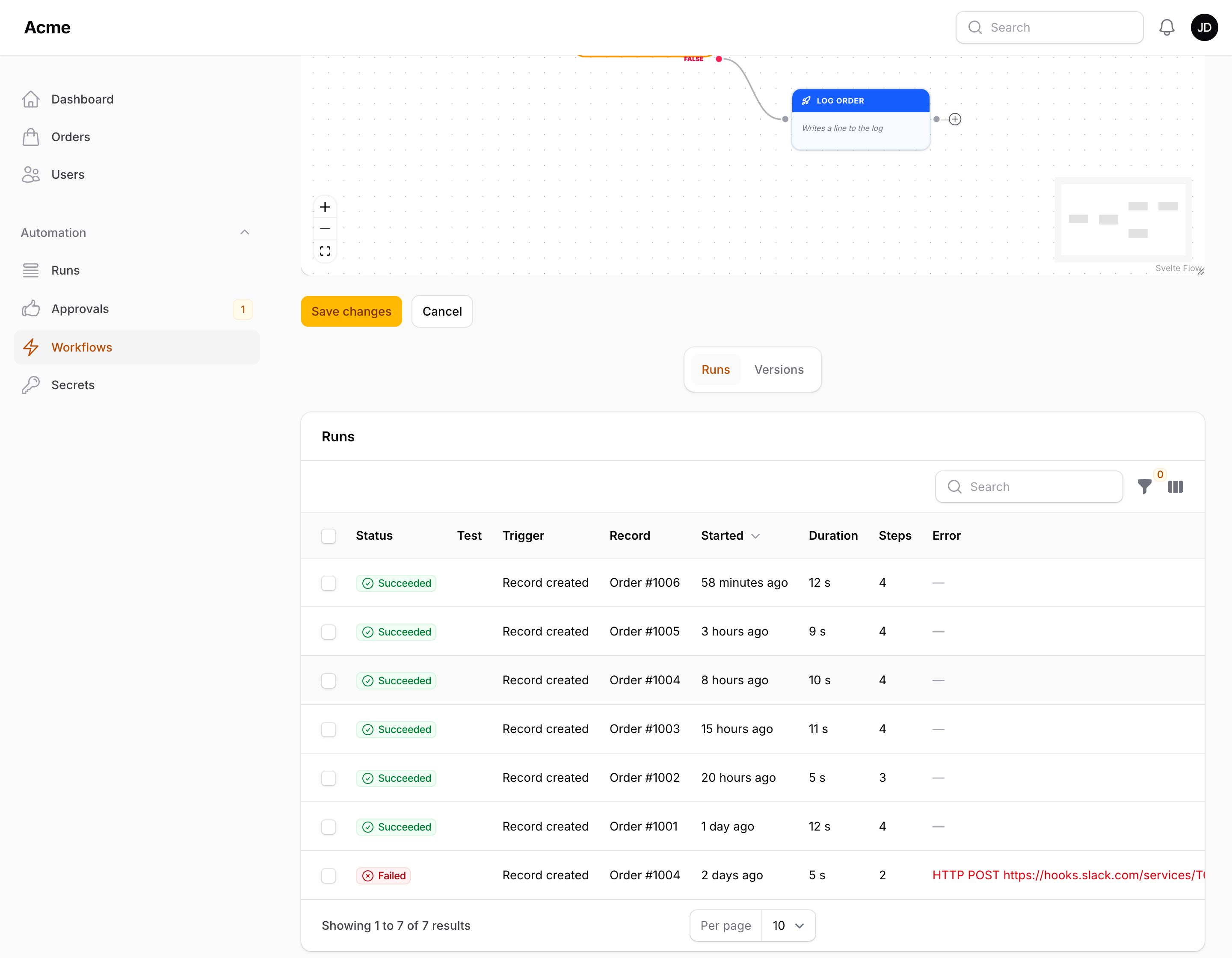
Statuses
| Status | Stored as | Meaning |
|---|---|---|
| Running | running |
The runner is walking the graph right now |
| Waiting | delayed |
A Wait step paused the run; a delayed job will resume it |
| Succeeded | success |
Every branch finished without an exception |
| Failed | failed |
A node threw; the message is in the run's error |
Packstub\Flow\Enums\RunStatus is the enum behind the column; isFinished() is true for Succeeded and Failed.
What a run records
| Column | |
|---|---|
trigger_type |
The class of the trigger node the run started from |
subject_type, subject_id |
The record the run started for (the model in the payload), used by "Run once per record" and shown in the Runs tab |
context |
A JSON summary of the payload: models become {"type": "App\\Models\\Order", "key": 42}, other objects {"type": "App\\Events\\OrderShipped"}, scalars and arrays as they are |
steps |
The step log, one entry per visited node: at, node_id, type, label, message, status (ok, retry or failed), duration_ms, and output when the action produced one |
error |
The exception message when the run failed |
pending_resumes |
How many delayed resumes are still due |
started_at, finished_at |
Timestamps; the Runs table shows the duration between them |
Step messages are, in order of appearance: "Triggered", "Condition met, following the "true" branch" / "Condition not met, following the "false" branch", "Done" after an action, "Waiting n seconds before continuing" at a Wait, "Nothing to run after the wait; finished", and "Resumed after waiting" when a delayed job picks the run back up. A retried action logs "Attempt n of m failed (…), retrying"; an action set to continue on error logs "Failed (…), continuing as configured"; the step that fails a run carries the error message.
The Details action on a run opens a modal with the status, trigger, record, start time, duration, the error (if any), the numbered steps with their time, duration and output, and the payload summary. Run again on a finished run starts the workflow once more from the same trigger with the same payload — records are fetched fresh by key — so a failed HTTP call or email can be repeated after the cause is fixed.
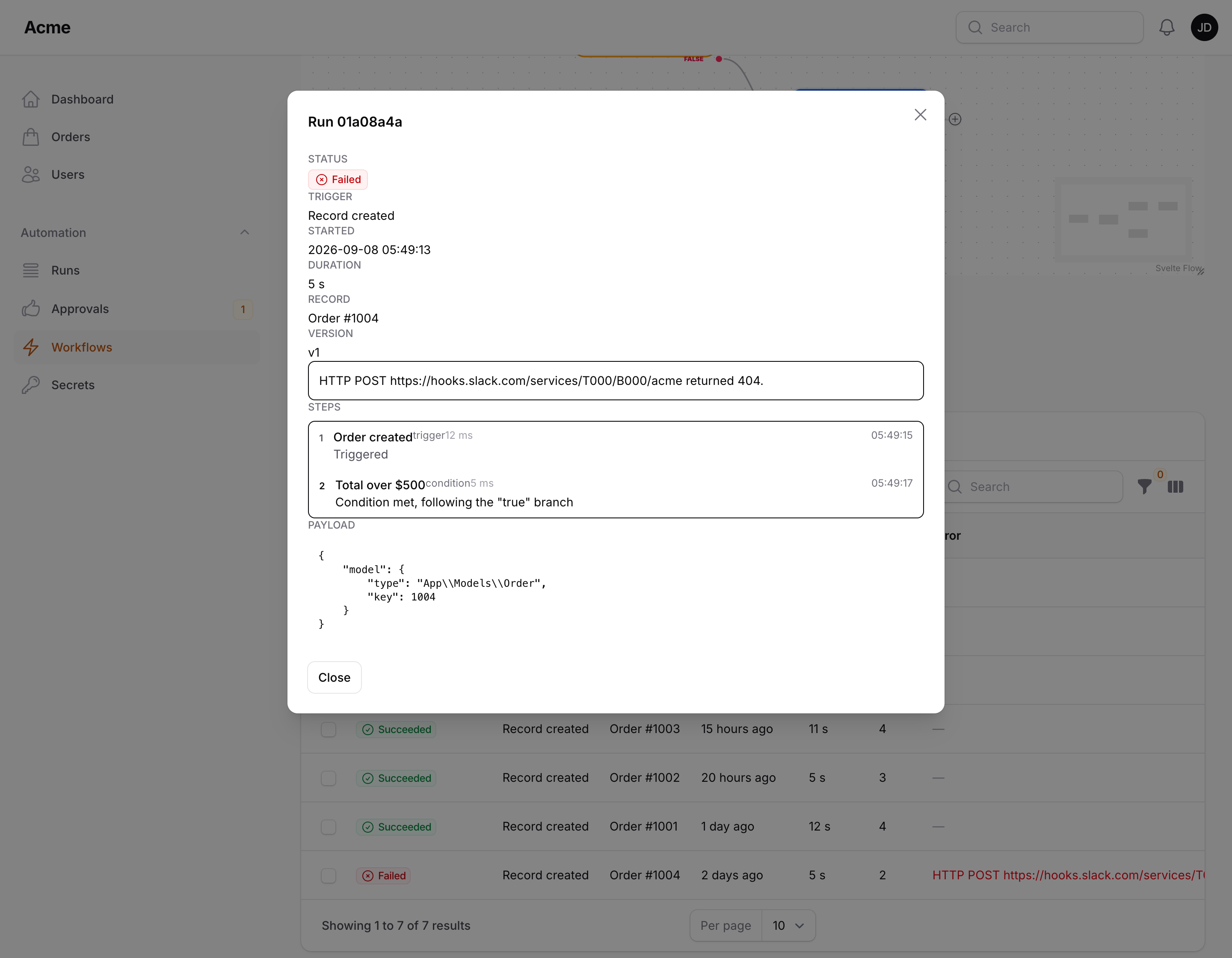
Runs can be deleted in bulk from the tab.
Run now
Run now is available in the Workflows table and in the header of the edit page for every active workflow that has at least one trigger node. It starts the workflow from its first trigger with the payload ['manual' => true] and shows a notification with the result — the status, or the error message when the run failed. When runs are queued, the notification says the run was queued and the result appears in the Runs tab.
Because there is no record in that payload, nodes that need one (a Record attribute condition, Update record) fail on such a run. It is the quickest way to try schedules, webhooks, notifications, Slack messages and logging.
Console commands
packstub-flow:run
php artisan packstub-flow:run "Welcome sequence"
php artisan packstub-flow:run 9d2f4a1e-... --payload='{"answer": 42}'
Runs a workflow by id or name from its first trigger node, synchronously even when queued runs are enabled, prints each step, and exits with a non-zero code when the workflow is missing, inactive, has no trigger node, or the run failed. --payload is a JSON object passed as the payload.
packstub-flow:prune
php artisan packstub-flow:prune
php artisan packstub-flow:prune --days=7
Deletes finished runs (Succeeded or Failed) that started more than the given number of days ago — prune_runs_after_days from the config (30) when --days is omitted. A workflow with its own Keep runs for (days) setting (in the Run settings of its Settings modal) uses that value instead. Waiting runs are kept. Schedule it as you would any cleanup:
Schedule::command('packstub-flow:prune')->daily();
packstub-flow:cron
Starts every active workflow whose Schedule trigger is due at the current minute — and, with schedule_catch_up_minutes (or --catch-up=N), for the minutes missed since the last run. The plugin registers it with Laravel's scheduler for you; see Queue & scheduling.
Retention and failure limits
The Run settings in a workflow's Settings modal hold two per-workflow limits:
| Setting | |
|---|---|
| Keep runs for (days) | Overrides prune_runs_after_days for this workflow |
| Deactivate after consecutive failures | Once this many runs in a row have failed, the workflow is switched off (is_active = false), a WorkflowDeactivated event is fired, a warning is logged, and the panel users listed in notifications.recipients (config) get a database notification naming the workflow and the last error. A successful run resets the counter |
Events
Three events let your application react to runs:
| Event | When | Properties |
|---|---|---|
Packstub\Flow\Events\WorkflowStarted |
The run row exists, before the first node | Workflow $workflow, WorkflowRun $run, array $payload |
Packstub\Flow\Events\WorkflowCompleted |
The run finished with status Succeeded (a run that pauses at a Wait fires it when the last resume completes) | same |
Packstub\Flow\Events\WorkflowFailed |
A node threw | same, plus Throwable $exception |
use Illuminate\Support\Facades\Event;
use Packstub\Flow\Events\WorkflowFailed;

Event::listen(WorkflowFailed::class, function (WorkflowFailed $event): void {
    Log::warning("Workflow {$event->workflow->name} failed: {$event->exception->getMessage()}");
});
Test runs
The Test button on a workflow's edit page performs a dry run: pick the trigger to start from, optionally a record (as {{ model }}) and extra JSON payload (a webhook body, for instance). Conditions are evaluated for real and read-only actions (Find records) execute; every other action is simulated — the step log shows what it would have used, with placeholders filled in (secrets excluded), instead of sending, calling or writing anything. Wait steps are skipped, approvals and signals follow their first outcome, Call workflow is not called.
Test runs are stored like any run, flagged with a beaker icon, hidden from the Runs page by default, and never counted for "run once per record", dedup windows or consecutive-failure limits; they fire no WorkflowStarted / WorkflowCompleted events. Flow::test($workflow, $payload, $startNodeId) does the same from code.
The Runs page
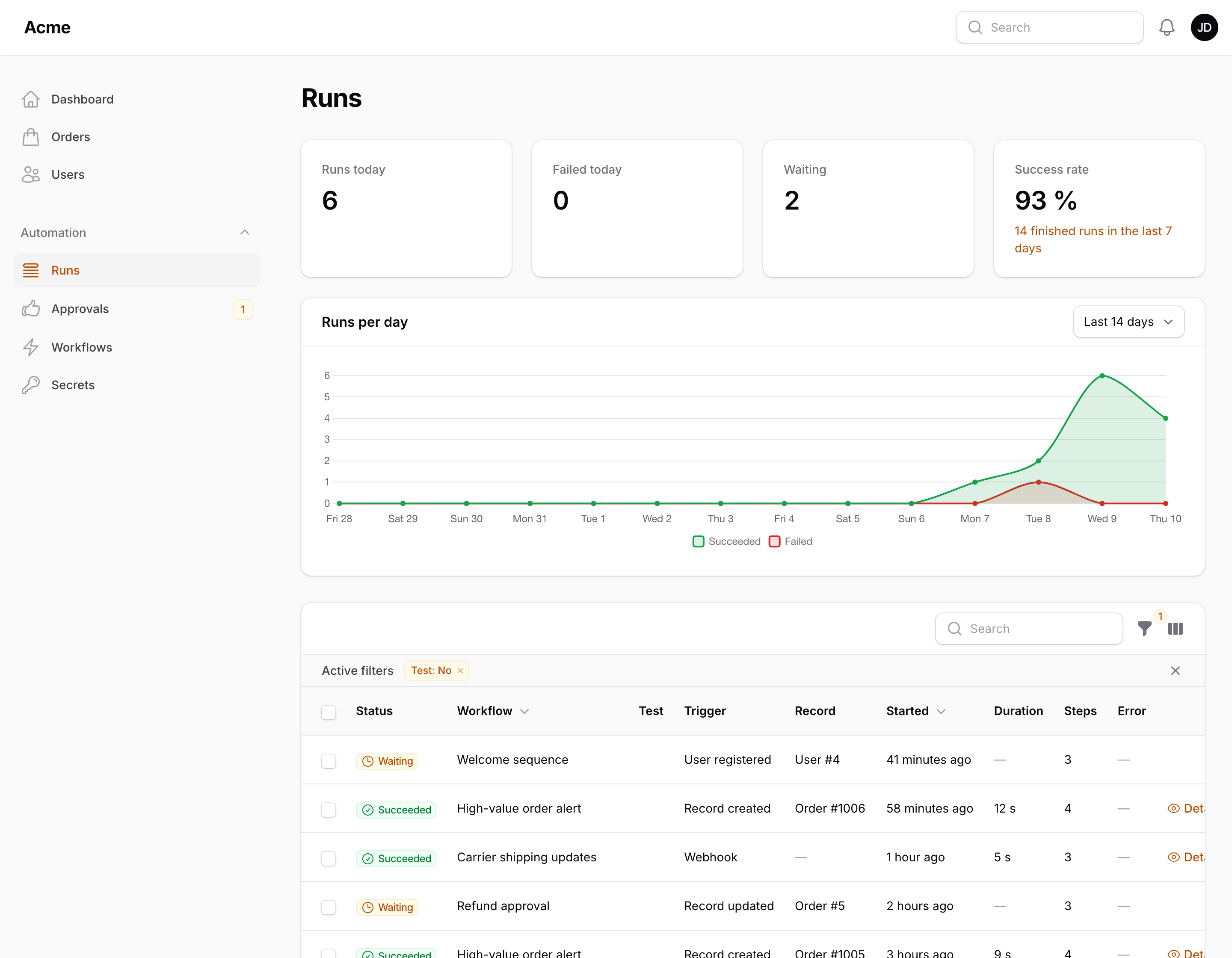
Besides the Runs tab under each workflow, the Runs page (next to Workflows in the navigation) lists every run across workflows, with filters by status, workflow, date and test runs, the details modal, Run again, and Open on the canvas — which opens the workflow with the failing node selected and centred. Step labels in the details modal link to their node the same way.
Above the table: four stats (runs today, failed today, runs waiting, the 7-day success rate) and a Runs per day chart of succeeded and failed runs over the last 7, 14 or 30 days. Below it, Slowest workflows lists the five workflows whose runs took longest in the last 7 days, with the run count, the average duration (the sum of a run's step timings) and the failure rate. Test runs are left out of all of them, and in a panel with tenancy they cover the current tenant's runs. The widgets are Packstub\Flow\Filament\Widgets\RunsOverview, RunsChart and SlowestWorkflows; they can be placed on a dashboard like any Filament widget, and a subclass of the page can override getHeaderWidgets() / getFooterWidgets() to change the set.
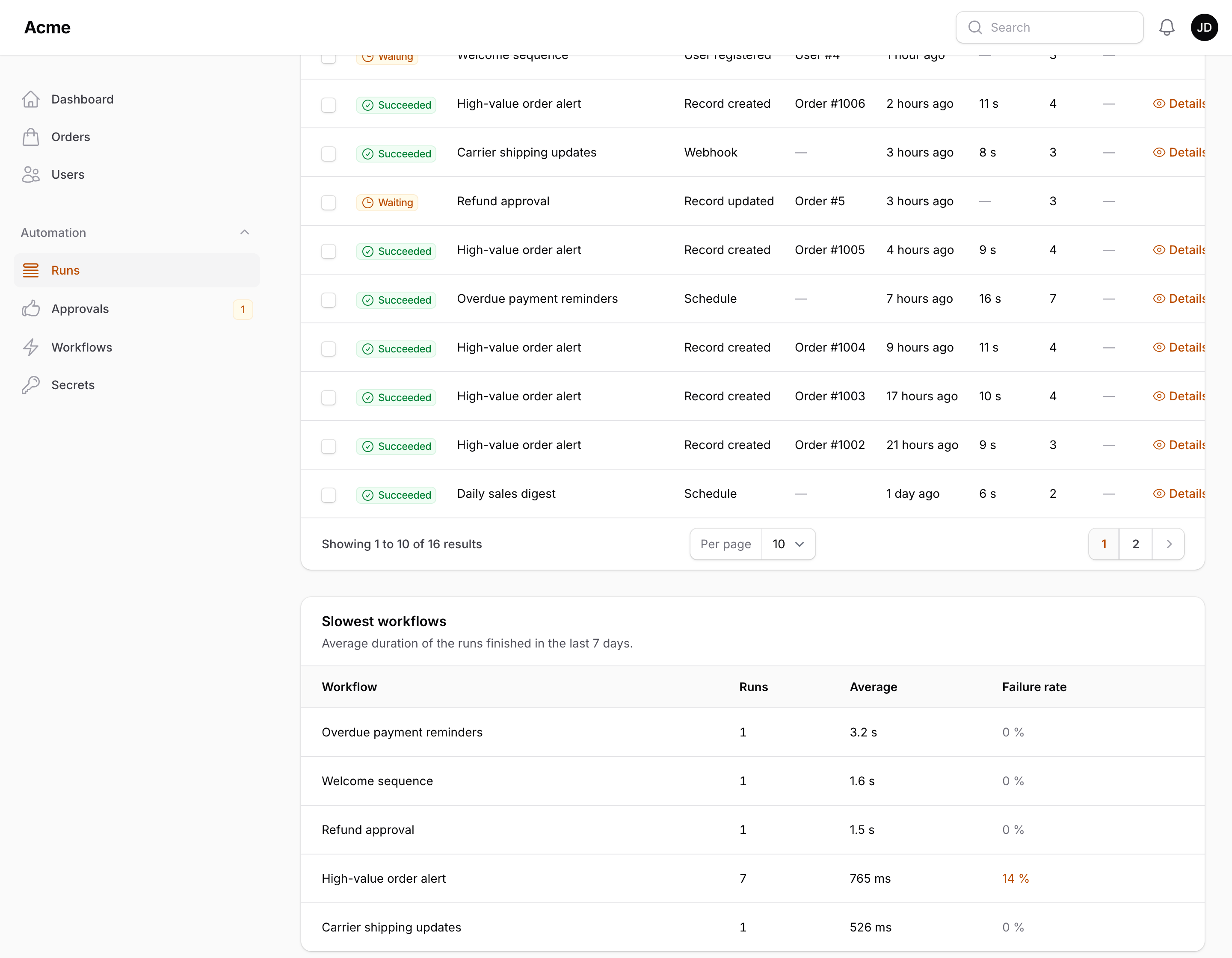
Steps are stored one row per step in the flow_workflow_steps table (WorkflowStep model; $run->steps returns them as arrays, $run->steps() as the relationship) rather than in a JSON column, so a run with hundreds of steps costs one insert per step and the Runs page can count and filter them.
Versions
Every save that changes the definition stores a snapshot in the Versions tab of the workflow — the version number, who saved it, when, the node count and a summary of what changed compared to the previous one (nodes added, removed, changed; connections added or removed). Moving nodes around is not a change. The current version is marked; Compare opens the summary in a modal; Restore puts an older definition back on the canvas as a new version, so nothing is ever lost. Each run pins the version it started from (version_id, the Version column of the Runs tab). Older versions are pruned beyond versions.keep (50) per workflow.
Audit trail
Every workflow records who created it and who last saved it (created_by, updated_by: the user's email, or id) — shown under the title of the edit page ("Last saved by jane@acme.test 2 hours ago") and as two hidden-by-default columns of the Workflows table; the Versions tab has the same for every change to the definition. Saves made by the engine itself (the failure counter, a deactivation after too many failures) do not overwrite updated_by.
With spatie/laravel-activitylog installed, the plugin also writes to the activity log: created, updated (with the changed attributes and a summary of the definition change), activated, deactivated and deleted, under the packstub-flow log name, performed on the workflow and caused by the signed-in user. Switch it off with audit.activity_log => false; the log name is audit.log_name.
Failures
When a node throws, the run is marked Failed with the exception message and finished_at, the exception is passed to Laravel's report() — so it reaches your log and error tracker as usual — and WorkflowFailed is dispatched. The exception is not rethrown: the request, model event or job that triggered the workflow carries on. Branches leaving the same node run one after another in the order their edges were drawn, so the branches after the failing one do not run, and side effects of the ones before it stand. A resume job for a run that another branch has since failed does nothing.
Every action node has an Error handling section in its settings:
| Setting | |
|---|---|
| Retries | How many extra attempts to make when the action throws (0–10) |
| Seconds between retries | A pause between attempts |
| After the last failure | Fail the run (default), Log it and continue — the failure is reported and logged as a step, and the branch carries on — or Follow the error branch |
Retries repeat the whole action, so use them for actions that are safe to repeat (an HTTP call to an idempotent endpoint, a notification) rather than ones that are not.
Follow the error branch adds a red Error output to the node on the canvas. Connect it to the steps that handle the failure — a Slack message, a "needs attention" flag, a Call workflow — and they run with {{ error.message }}, {{ error.node }} and {{ error.node_id }} in the payload; the run then succeeds. With nothing connected to the Error output the node fails the run as usual.
For failures anywhere in a workflow, the On failure, run setting (in Run settings) names another workflow — one with a Called by another workflow trigger — that starts whenever a run fails, with the failing run's payload plus {{ error.message }} and {{ failed_run.workflow }} / {{ failed_run.id }} / {{ failed_run.error }}. A handler cannot trigger itself.
Typical failure messages:
| Message | Cause |
|---|---|
Cycle detected at node [...] |
An edge leads back to a node already visited on the same path |
Workflow exceeded the maximum number of steps. |
More than max_steps nodes were visited in one run |
Action [...] is not registered. / Condition [...] is not registered. |
The node's class is not registered (removed from the config or hidden with without()) |
Start node [...] not found in workflow. |
Flow::run() was given a node id that is not in the definition |
Cannot resume: node [...] no longer exists. |
A resume job refers to a node missing from its graph snapshot |
Update record needs a record in the payload; use it after a record trigger. |
Update record on a run without a model |
HTTP POST https://... returned 500. |
HTTP request with "Fail the run on a 4xx / 5xx response" on |
Workflows are calling each other more than 10 levels deep. |
Call workflow recursion |
Safety guards
- Cycle guard — the runner remembers the path from the trigger to the current node; reaching a node that is already on that path fails the run instead of looping. A node reachable through two separate branches (a diamond) runs once, for the first branch that reaches it.
- Definition checks — an active workflow cannot be saved without a trigger, with nodes that nothing leads to, or with a required setting left empty (see Building workflows).
- Maximum steps — a run stops after visiting more than
max_stepsnodes (1000 by default). Set it in the config. - Registered nodes only — a definition can only instantiate classes registered with the plugin; anything else fails the run with "is not registered".
- Call depth — nested Call workflow actions stop at 10 levels.
- Nesting depth — a run can start other runs (a record update saved with events on fires Record updated, a mail fires an event…). Runs nested more than
max_nestinglevels deep (5 by default) are not started, so a workflow that updates its own record without Save without firing events stops instead of looping forever. - Failure limit — an optional per-workflow "deactivate after N consecutive failures" (see above).
- Suppression —
Flow::suppress(fn () => ...)runs a block of code with every trigger disabled. - Loop limits — a For each node fails the run when its list is longer than its maximum iterations (never more than
max_records).
Next: Queue & scheduling.