Approvals & signals
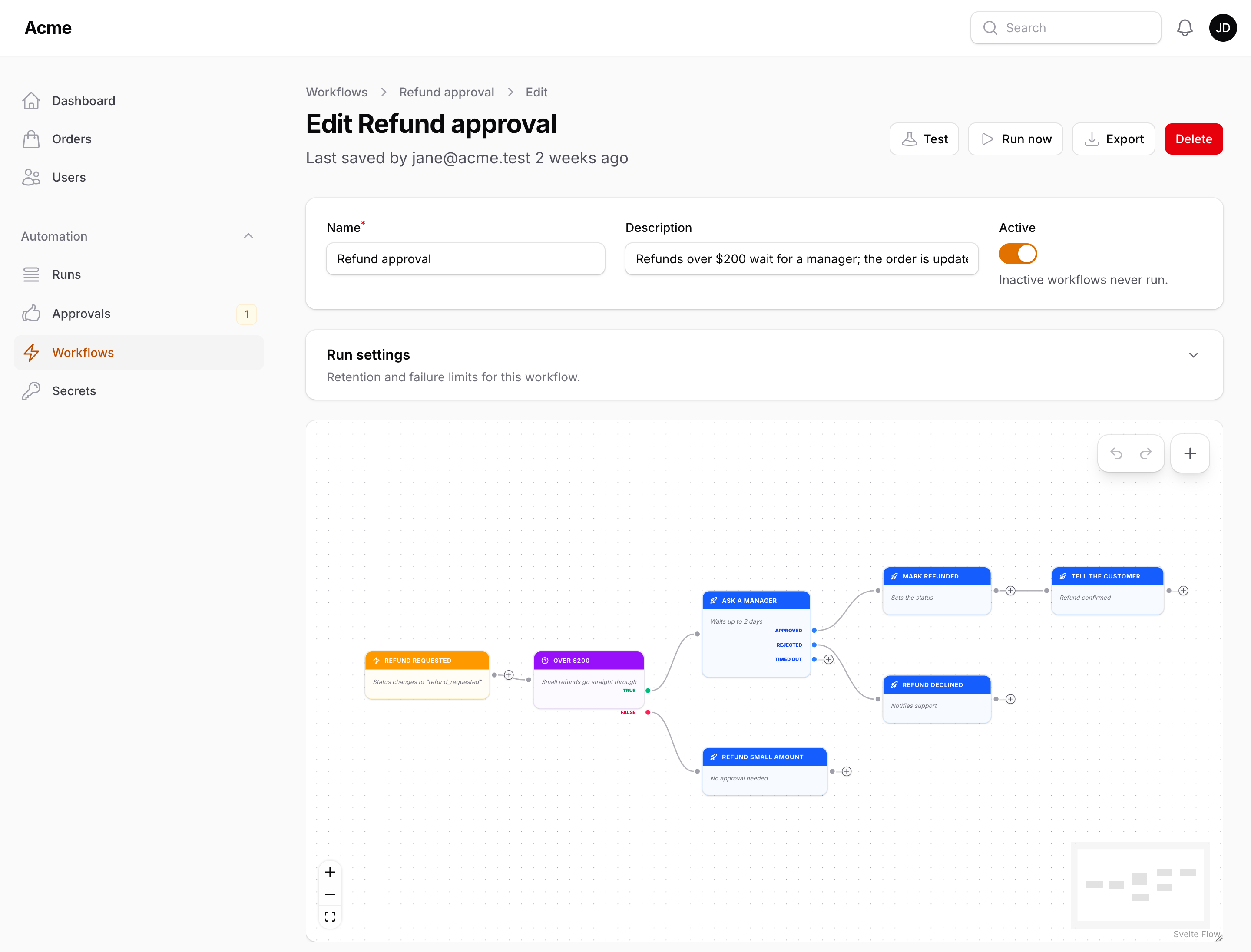
Two actions pause a run until something outside the workflow happens. Ask for approval waits for a person; Wait for signal waits for your code. Both keep the run in the Waiting status, survive deploys and queue restarts (the wait is a database row, not a sleeping job), and continue along the output that matches the outcome.
Ask for approval
| Setting | |
|---|---|
| Approvers | Email addresses of panel users, comma separated; placeholders allowed ({{ model.owner.email }}). Empty lets anyone who can open the Approvals page decide |
| Request title / Details | Shown in the notification, the email and on the Approvals page; placeholders allowed |
| Timeout | 0 waits forever; otherwise the run continues along Timed out after this long |
| Send a panel notification | On by default: a Filament database notification with Approve / Reject buttons and a link to the Approvals page |
| Also send an email | With signed Approve / Reject links |
Outputs: Approved, Rejected, Timed out. After the decision the nodes on that branch can read:
| Placeholder | |
|---|---|
{{ approval.outcome }} |
approved, rejected or timed_out |
{{ approval.by }} |
The approver's email |
{{ approval.comment }} |
The comment left on the Approvals page |
{{ approval.at }} |
When it was decided |
Deciding
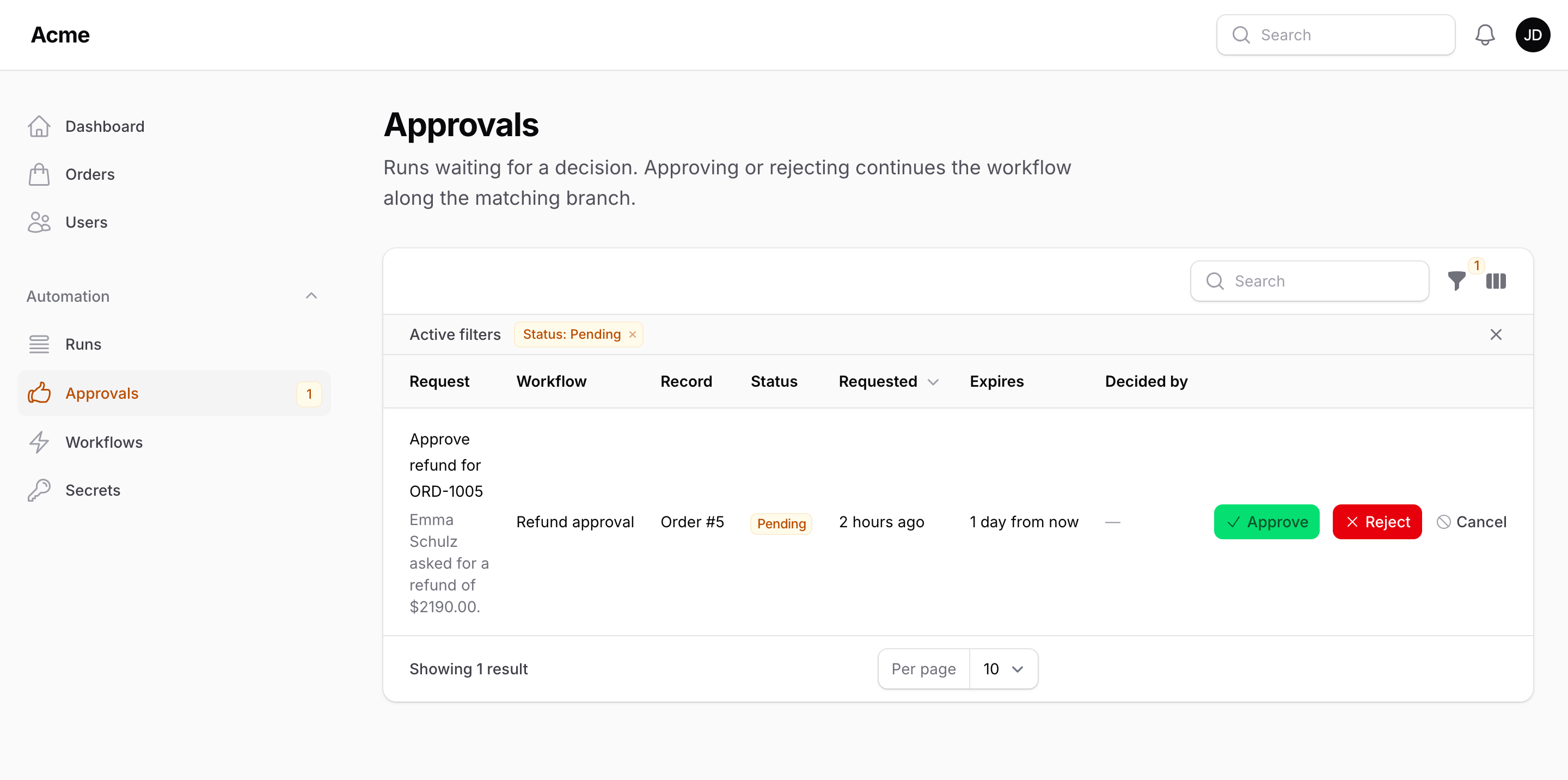
- The Approvals page (next to Workflows in the navigation, with a badge counting the pending requests for the signed-in user) lists the requests the user may decide: the title and details of each, the workflow and the record it is about, its status and when it was requested and expires, with Approve / Reject buttons and an optional comment. The record, the deadline and who decided are also columns of their own, hidden until toggled on. Users who may manage workflows see every request and can cancel one (the ⊘ button), which continues the run along Timed out.
- The notification buttons and email links are signed URLs (
flow/approvals/{wait}/{outcome}, valid forapprovals.link_lifetime_hours, 72 by default) that need a signed-in user who is one of the approvers; they decide and redirect to the Approvals page. A request that was already decided shows a warning and changes nothing. - From code:
Flow::resolveWait($wait, 'approved', ['comment' => '...'], 'who@example.com')returnstrueonce — the first decision wins.
Wait for signal
| Setting | |
|---|---|
| Signal key | What your code will call Flow::signal() with; use placeholders to make it unique per record: payment.{{ model.id }} |
| Timeout | As above |
Outputs: Received, Timed out. Continue the run from anywhere in your application — a webhook controller, a job, an observer:
use Packstub\Flow\Facades\Flow;

Flow::signal("payment.{$order->id}", ['amount' => $payment->amount]);   // returns how many runs continued
The data becomes {{ wait.amount }} (and {{ wait.outcome }}) on the Received branch. Every pending wait on that key is resolved, so several workflows can wait on the same signal.
Timeouts, cancellation, cleanup
packstub-flow:cron times out waits past their deadline every minute (they continue along Timed out). Pending waits are shown in a run's details; the flow_workflow_waits table (WorkflowWait model, pending() / approvals() scopes) is yours to query. Deleting a run or a workflow deletes its waits.
In a test run
A test run does not wait: the step is logged as simulated and the run follows the first outcome (Approved / Received).
Next: Runs.