Styling
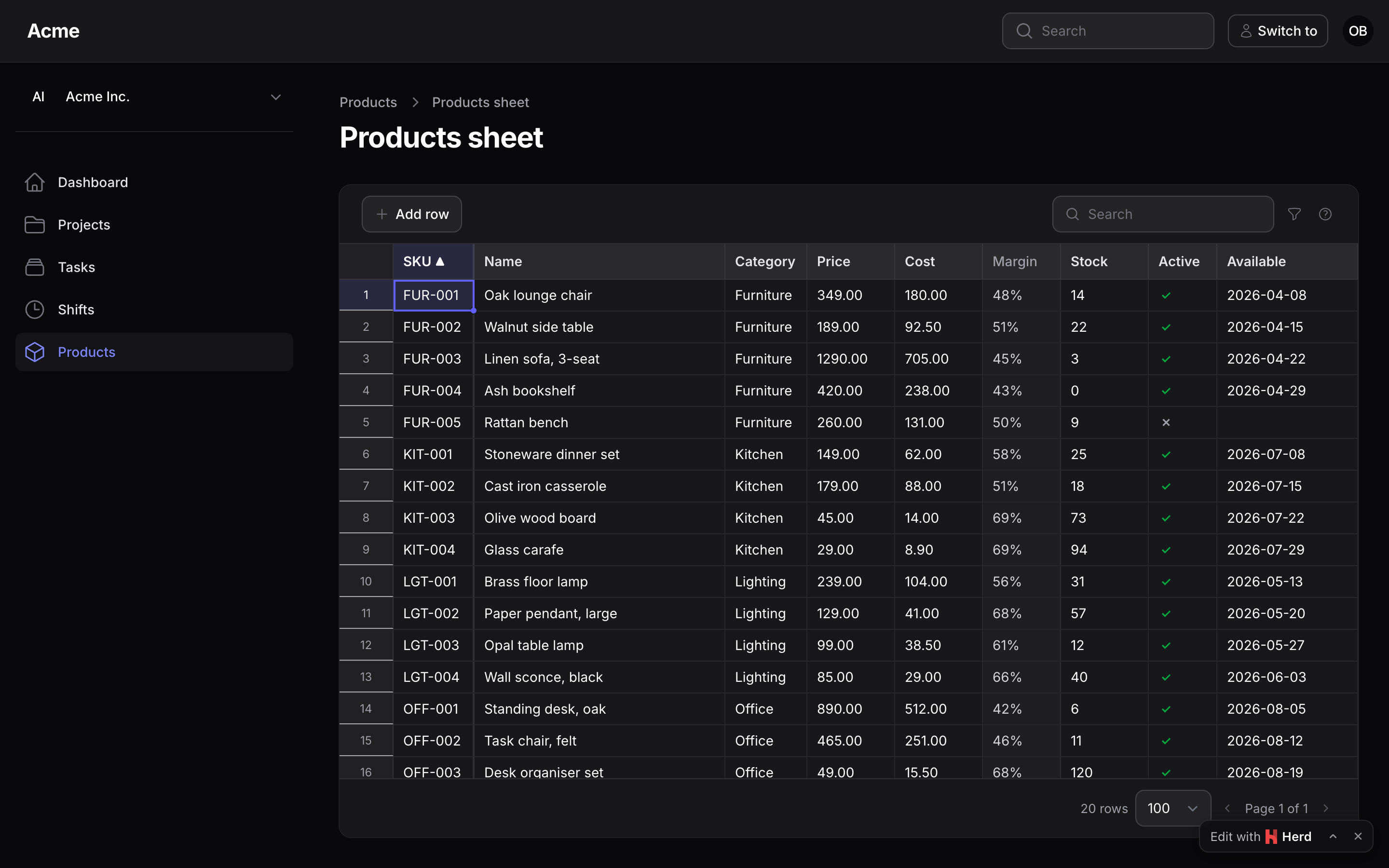
The stylesheet bundles Tabulator's base CSS and lays Filament's colour variables (--gray-*, --primary-*, --danger-*, --warning-*, --success-*) over every coloured surface, so the sheet follows your panel's theme and dark mode without compiling the plugin's views. The sheet is a table-style container, the same shell as Filament's own tables and as Kanban and Gantt (the ring and the rounded corners, the toolbar with a line under it, the grid, the footer with a line over it), and the toolbar, the filters, the badges, the row menu and the Discard / Delete rows dialog are Filament's own Blade components (x-filament::button, x-filament::input.wrapper, the searchable select and the date picker behind Select and DatePicker, x-filament::input.checkbox, x-filament::badge, x-filament::dropdown, x-filament::modal, the dropdown's list classes for the row menu), styled by the panel's stylesheet like any Filament page, so a theme that restyles Filament's buttons or inputs restyles the sheet's. The toolbar uses logical properties: it reads right-to-left with the panel.
Variables
Restyle it by overriding the --ps-sheet-* variables on .ps-sheet in your theme. The first group is the shell's, the same names (with their own prefix) in Kanban (--ps-kanban-*) and Gantt (--ps-gantt-*), so one theme rule per plugin restyles the three alike; the rest are the sheet's own:
.ps-sheet {
    /* the shell, shared with Kanban and Gantt */
    --ps-sheet-bg: #fff;                        /* the container (gray-900 in dark mode) */
    --ps-sheet-surface: var(--gray-50);         /* a raised surface: a key cap */
    --ps-sheet-border: var(--gray-200);         /* the lines under the toolbar and over the footer */
    --ps-sheet-line: ...;                       /* the grid's cell lines */
    --ps-sheet-text / -muted / -soft;           /* text, the status line, read-only cells */
    --ps-sheet-ring: var(--primary-500);        /* the active cell's border, the fill handle, an active filter's ring */
    --ps-sheet-radius: 0.75rem;                 /* the container's corners, as a table's */
    --ps-sheet-shadow: 0 1px 2px 0 rgb(0 0 0 / 0.05);
    --ps-sheet-outline: rgb(9 9 11 / 0.05);     /* the container's 1px ring */
    --ps-sheet-mono: ui-monospace, ...;

    /* the sheet's own */
    --ps-sheet-height: auto;                    /* the grid's height: auto is measured by the sheet, a length fixes it */
    --ps-sheet-dirty: var(--warning-500);       /* the amber corner */
    --ps-sheet-dirty-bg: ...;
    --ps-sheet-error: var(--danger-500);
    --ps-sheet-error-bg: ...;
    --ps-sheet-conflict: #a855f7;
    --ps-sheet-conflict-bg: ...;
    --ps-sheet-locked: ...;                     /* read-only cells */
    --ps-sheet-created-bg: ...;                 /* the number cell of a new row */
    --ps-sheet-range: ...;                      /* the selection */
    --ps-sheet-head / -head-text / -hover;      /* the grid's header and a hovered row */
    --ps-sheet-font: inherit;
}
The dark palette is set under .dark .ps-sheet. The grid's height is measured by default: the window below the grid's top edge, less what follows the grid on the page (the line under it, the page's padding, anything after the sheet), so the page does not scroll for the sheet alone; a page with fewer rows than that fits shrinks the grid to its rows (at least three), and the height follows the window, the toolbar wrapping to a second line, and the rows as they are added. A sheet far down a long page (under a form) takes the window below the top bar instead of what is left of the first screen, and the page scrolls to it. To fix the height, getSpreadsheetHeight() on the page returns a CSS length ('32rem', 'calc(100dvh - 20rem)'), which the sheet sets as --ps-sheet-height on its root, or set the variable to a length in your theme; auto means measured. The grid scrolls inside its height and renders only the rows around the visible window, so a fixed height must be a real one: a percentage of a parent without a height would not be a height at all.
Classes to hook
| Class | On |
|---|---|
.ps-sheet, .ps-sheet-is-dirty, .ps-sheet-is-saving, .ps-sheet-is-loading, .ps-sheet-is-readonly |
the root |
.ps-sheet-toolbar, .ps-sheet-toolbar-start, .ps-sheet-toolbar-end, .ps-sheet-btn, .ps-sheet-btn-primary, .ps-sheet-btn-danger, .ps-sheet-search, .ps-sheet-filters-btn, .ps-sheet-pill-dirty |
the toolbar |
.ps-sheet-filters-panel, .ps-sheet-filters-above, .ps-sheet-filters-inline, .ps-sheet-filters-header, .ps-sheet-filters-count |
where the filters are (the fields themselves are Filament's own Select, Toggle and DatePicker, styled by the panel), the count on the funnel |
.ps-sheet-footer, .ps-sheet-status, .ps-sheet-hint, .ps-sheet-pill-errors, .ps-sheet-pager |
the footer under the grid |
.ps-sheet-cell-dirty, .ps-sheet-cell-error, .ps-sheet-cell-conflict, .ps-sheet-cell-locked |
a cell |
.ps-sheet-row-created, .ps-sheet-row-deleted, .ps-sheet-row-readonly, .ps-sheet-row-error |
a row |
.ps-sheet-col-<type>, .ps-sheet-col-sortable, .ps-sheet-col-readonly, .ps-sheet-rownum |
a column's cells and header |
Tabulator's own classes (.tabulator-row, .tabulator-cell, .tabulator-range, .tabulator-editing…) are there too, scoped under .ps-sheet.
Translations
Strings live in resources/lang/{en,ro,ru,de}/spreadsheet.php and are sent to the browser with the sheet. Publish them to change or add a language:
php artisan vendor:publish --tag=packstub-spreadsheet-translations
Plural forms use Laravel's {0} …|{1} …|[2,*] … syntax, read the same way in the browser.
Dates and numbers
A number cell is formatted with Intl.NumberFormat in the panel's locale (app()->getLocale()), a date cell with the column's PHP format() (month and day names in that locale). What is copied to the clipboard is plainer: fixed decimals, ISO dates, TRUE/FALSE, option labels, so it pastes back cleanly, into this sheet or a spreadsheet.