Search, sort, filters, pagination
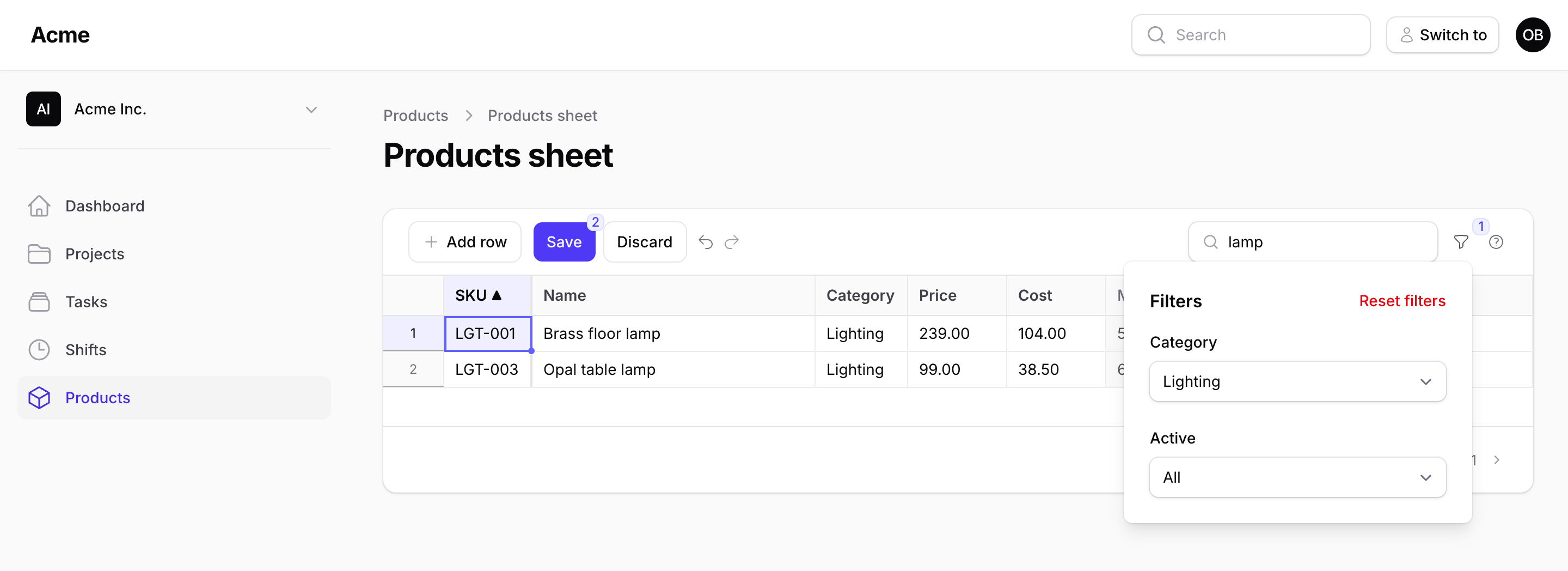
The sheet sits in a table-style container, as a Filament table does: the toolbar on top with the sheet's own controls at the start and the search, the filters and the shortcuts button at the end, the grid under it, the status line and the pager in a footer. The controls are Filament's own components (its buttons, the search field a table has, its searchable select, its date picker, its checkbox, in Filament's input wrapper), so it looks like the rest of the panel and like Kanban and Gantt, which share the same shell; what does not apply is not shown: Save, Discard, Undo and Redo appear once something was changed, Delete rows once rows are selected, the errors badge once a save refused cells.
Everything the toolbar does happens on the server, one renderless call per change (spreadsheetRows), and none of it touches the unsaved cells.
Search
->searchable(['sku', 'name', 'category.name'])
The search box looks in these attributes with like %term% (ilike on Postgres); a dotted path searches a BelongsTo/HasMany relation's attribute. Wildcards in the term are escaped (with ! and an explicit ESCAPE clause, which SQLite, MySQL and Postgres all parse), so 100% finds 100% cotton. The box debounces; the term is cut at 200 characters, and only the latest answer is shown when requests overlap. An answer that arrives while you are typing in a cell takes that cell first: what you typed becomes an unsaved change, then the new rows are shown.
Sort
->defaultSort('sku') // or ('price', 'desc')
A click on a header sorts by that column, another click reverses it; the arrow shows which. Only a sortable column is accepted (a computed column and a dotted path are not; ->sortable(false) opts a column out): anything else the browser could send falls back to the default sort. The primary key is always the tie-breaker, so pages never overlap.
A sortable column must be a real database column: the sort is an ORDER BY on it. A column backed by an accessor, a JSON path or a virtual attribute sorts to a query error ("The rows could not be loaded."), so mark it ->sortable(false).
Filters
use Packstub\Spreadsheet\Filter;

->filters([
    Filter::select('category_id')->options(fn () => Category::pluck('name', 'id')->all()),
    Filter::select('status')->options(['live' => 'Live', 'draft' => 'Draft'])->label('State'),
    Filter::select('tags')->multiple()->options(Tag::pluck('name', 'id')->all())->query(fn (Builder $query, array $ids) => $query->whereHas('tags', fn ($q) => $q->whereIn('tags.id', $ids))),
    Filter::select('supplier_id')->searchable()->preload(false)
        ->getSearchResultsUsing(fn (string $search) => Supplier::where('name', 'like', "%{$search}%")->limit(50)->pluck('name', 'id')->all())
        ->getOptionLabelUsing(fn (string $value) => Supplier::find($value)?->name),
    Filter::boolean('is_active'),
    Filter::toggle('low_stock')->label('Low stock')->query(fn (Builder $query) => $query->where('stock', '<', 5)),
    Filter::dateRange('available_on'),
])
The same Filter class as Kanban and Gantt, with the same types:
| Filter | The field | What query() gets |
The default |
|---|---|---|---|
Filter::select('column') (or make()) |
Filament's select, All for none | the option's key as a string ("3" for an id) |
where(column, value) |
->multiple() |
the same select taking several options | a list of keys | whereIn(column, values) |
->searchable() |
the select with a search box | the typed key (any key: the query decides) | where(column, value) |
Filter::boolean('column') |
a Yes / No select | true or false |
where(column, true|false) |
Filter::toggle('name') |
Filament's toggle with the label | true (off, it is not called) |
none: query() is required (the sheet refuses to render without it) |
Filter::dateRange('column') |
Filament's date picker twice, From and Until, either side open | ['from' => ?string, 'until' => ?string], each Y-m-d |
where(column, >=, from) and where(column, <, the day after until), plain ranges so the column's index stays in use |
options() takes an array or a closure (run once per request). A searchable select lists its options with the sheet (preload(), the default) and filters them on the server as the user types, by label unless getSearchResultsUsing() says otherwise; preload(false) sends nothing until the user types; getOptionLabelUsing() names a picked value the list does not hold; optionsLimit() caps what is listed or found (50), and also the values a searchable multiple filter accepts from the browser or the URL and the label lookups it answers (a value longer than 255 characters is dropped; a search term is read up to 200 characters). label() takes a string or a closure; the default is the name as a headline without _id / _at.
A value the filter did not offer is ignored: a plain select takes one of its options and nothing else (per value for a multiple one), a boolean 1 or 0, a toggle anything true, a date range real calendar days only (2026-02-30 never reaches the query). The browser cannot inject a raw value.
The fields are Filament's own form components (Select, Toggle, DatePicker), built by Filter::toFormComponent() and rendered through the component's spreadsheetFiltersForm schema, so they look and behave exactly like a form's; a searchable select's search goes through the component's schema (callSchemaComponentMethod), nothing on the page re-renders. The browser holds each filter's state in the shape Filter::state() gives ('' or a key, a list, true / false, {from, until}): a field dispatches its change to the sheet, which reloads the rows renderless and writes its state back into the fields, so Reset clears the fields as well as the rows. A filter that narrows the rows counts on the funnel button.
Pagination
->perPage(200)
The page size runs from 25 to max_per_page (1,000) in the footer under the grid, where the pager is, as in a Filament table; perPage() sets the initial one. Row numbers continue across pages. The grid scrolls inside its own height, the header and the toolbar staying in place, however many rows the page holds. Another page, page size, sort, search or filter result opens at its first row; the same page read again (a packstub-spreadsheet-refresh, the re-read after a save, Discard) stays where it was scrolled to, with the active cell and the selected range where they were (when that row is gone, on the row now at its place), so what you type next goes into the cell you were on. A sheet with 5,000 rows is five pages of 1,000 or fifty of 100; see Performance for what fits.
Where the filters are
Filters open from a funnel button in the toolbar by default, the number of active ones on the button, the fields stacked under a Filters heading with a Reset filters link, as a Filament table's do. filtersLayout() on the definition puts them elsewhere, and the config's filters_layout sets the default for every sheet:
use Packstub\Spreadsheet\Enums\FiltersLayout;

->filtersLayout(FiltersLayout::Toolbar)      // inline in the toolbar, after the search box, each label as its field's prefix
->filtersLayout(FiltersLayout::AboveContent) // on a row of their own between the toolbar and the grid, with the heading and Reset
->filtersLayout(FiltersLayout::Dropdown)     // behind the funnel button (the default)
The config takes the same three as strings: dropdown, toolbar, above. A sheet without filters renders no funnel. The date pickers show the config's date_format and start the week on first_day_of_week (1 = Monday).
When a request fails
A page, a sort or a page size the server did not answer (the connection dropped, the session expired) is not shown as if it had been: the pager, the header arrow and the size select go back to what the rows on screen are, and the sheet says so. Next after that is the page after the one you see. The search text and the filters stay as typed, so the next request sends them again.
Unsaved changes across all of that
Changed cells, new rows and deletion marks live in the browser and are keyed by record, not by position: change a price on page 1, search for something else, sort by stock, come back — the cell is still amber. The badge says "12 changes on 3 pages" so nothing is forgotten before Save; a Save sends every page's changes at once. New rows show at the bottom of whichever page is open; Add row scrolls the grid to the new one.