Columns
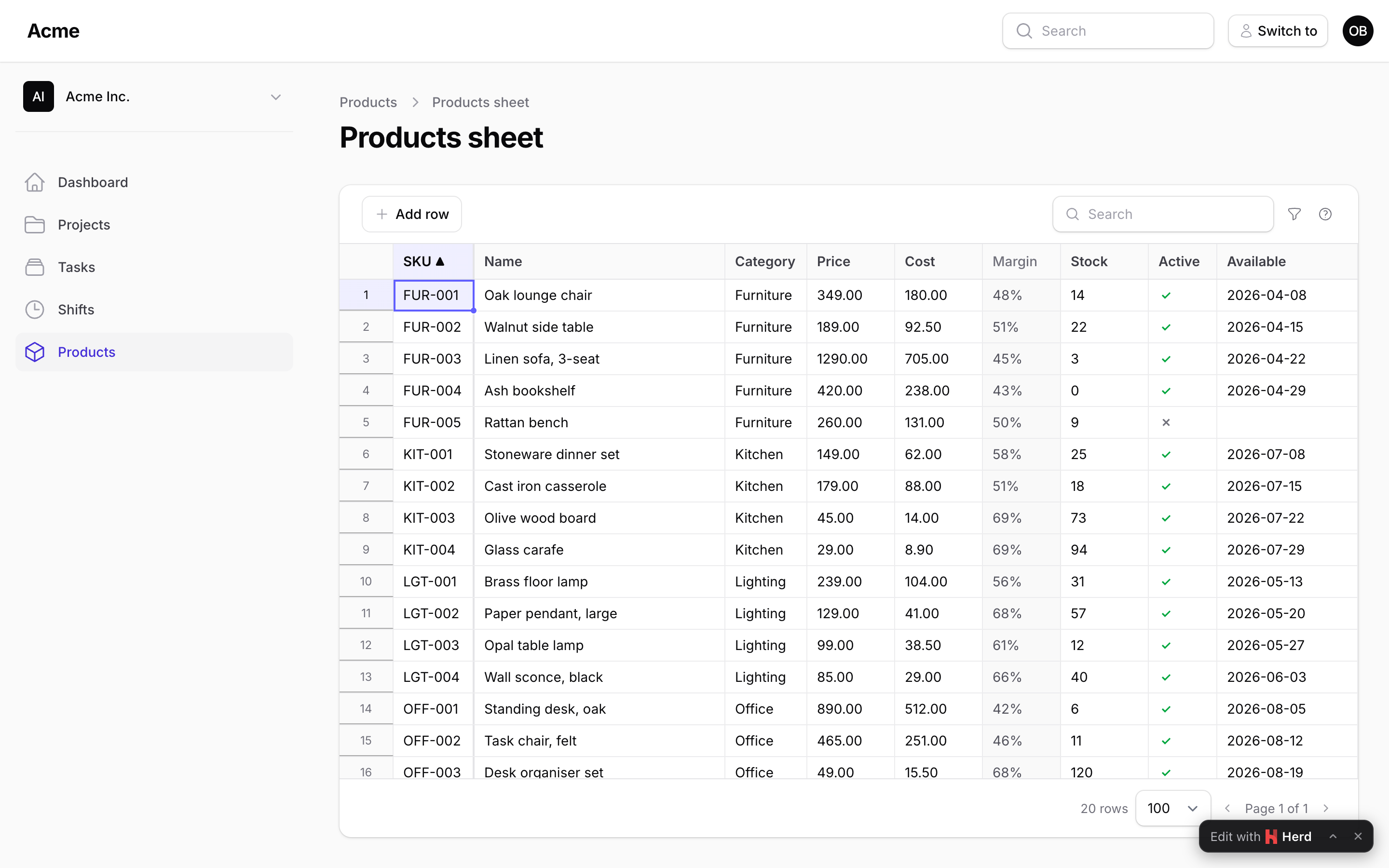
A column names an attribute of the model and says how it is read into the grid and written back. Every column lives in Packstub\Spreadsheet\Columns.
Common options
TextColumn::make('name')
    ->label('Product name')                  // default: the name, headlined ("category_id" → "Category")
    ->width(220)                             // pixels; default: what the content needs
    ->frozen()                               // pinned while scrolling sideways (`frozen_first_column` in the config pins the first one)
    ->readOnly()                             // never editable
    ->readOnly(fn (Product $p) => $p->is_locked) // not for some records: the cell is greyed and refused
    ->rules(['required', 'max:120'])         // Laravel rules (a list, "required|max:120", or fn (?Product $record): array)
    ->validationMessages(['required' => 'Every product needs a name.']) // per rule, as a Filament field (or a closure)
    ->validationAttribute('product name')    // what the default messages call it; default: the label
    ->default('Untitled')                    // the value a new row starts with (a value or a closure)
    ->hidden(fn () => ! auth()->user()->isAdmin()) // left out of the sheet, never written
    ->sortable(false)                        // no sorting from the header (a computed column never sorts)
    ->placeholder('Optional')
Rules are validated with Laravel's validator, with the type's own rules added. A unique rule, as a string (unique:products,sku) or as Rule::unique('products', 'sku'), ignores the record being updated, so an unchanged SKU never conflicts with itself.
A cleared cell (Delete, an empty pasted cell, a select whose search field was cleared) is written as null unless a required rule refuses it: the type's rules (numeric, date_format, in…) are marked nullable, so they let the empty cell through, while a required rule still fails on it (nullable never silences required). Give every NOT NULL column a required rule, so an emptied cell is refused with a message on the cell; without one the database refuses the row and the sheet marks it "This row could not be saved." (Saving).
A column whose name contains a dot (category.name) reads through the relation and is read-only.
TextColumn
TextColumn::make('sku')->maxLength(32)
Strings. maxLength() adds a max: rule and sets the editor's maxlength, so typing stops there (a paste is still validated, and refused with the rule's message). Without maxLength() the rule is max:65535 (a TEXT column's bound), so a value is never unbounded before the database; set a longer one yourself for a MEDIUMTEXT or LONGTEXT column.
NumberColumn
NumberColumn::make('price')->decimals(2)->min(0)->max(9999)
NumberColumn::make('stock')->integer()->min(0)
Numbers on the wire (a decimal:2 cast's "12.50" becomes 12.5). decimals() rounds what is saved and formats what is shown, half away from zero on the number as it is written (1.005 is 1.01, -2.675 is -2.68), the same in the browser and on the server; integer() refuses fractions and whole numbers past 9,007,199,254,740,991 (the largest a browser holds exactly). min() and max() add rules. What a paste brings is read the same way on both sides: with both separators present the last one is the decimal mark (1,234.50 and 1.234,50 are both 1234.5), a lone separator is read by the panel's decimal mark (app()->getLocale(), or the config's decimal_separator): the mark itself is always decimal (0,125 is 0.125 for a German panel, 125 for an English one), the other one is decimal with one or two digits after it (0.5) and groups thousands otherwise (1.234); spaces, thin spaces and apostrophes are ignored.
BooleanColumn
BooleanColumn::make('is_active')->default(true)
A tick or a cross; a double-click, Enter or Space flips it, Delete clears it (null). A paste accepts 1/0, true/false, yes/no, y/n, on/off (and a few translations).
SelectColumn
SelectColumn::make('status')->options(['draft' => 'Draft', 'live' => 'Live'])
SelectColumn::make('status')->options(fn () => Status::pluck('label', 'code')->all())
SelectColumn::make('status')->options(Status::class)         // a backed enum; labels from HasLabel or the case name
SelectColumn::make('category_id')->relationship('category', 'name')
SelectColumn::make('category_id')->relationship('category', 'name', fn (Builder $query) => $query->where('active', true))
The key is stored, the label shown; the list editor filters as you type. A paste matches by label first (case and spaces aside), then by key. A value that is none of the options is refused. relationship() takes a BelongsTo on the model: the column is the foreign key, the options are the related records (their key, their $titleAttribute), loaded once per request, narrowed by the closure. Options are sent to the browser with the sheet, so keep the list to what a select can hold; a relation with thousands of records wants a narrowing closure.
DateColumn and DateTimeColumn
DateColumn::make('available_on')->format('d/m/Y')
DateTimeColumn::make('published_at')->format('M j, Y H:i')
For date and datetime casts (or plain Y-m-d / Y-m-d H:i:s strings). On the wire the value is ISO (2026-02-28, 2026-02-28 09:30:00); the cell shows it in format() (default: the config's date_format / datetime_format) and edits it with the browser's date or date-time input. A paste is read as ISO or in the display format when it is numeric (28/02/2026 for d/m/Y, 28.02.2026 09:30 for d.m.Y H:i, a g:i a time with am/pm); month names are shown but not read back. Nothing is guessed: 2026-02-30 or tomorrow are refused.
A DateTimeColumn is wall-clock time in the app's timezone (app.timezone), the way Eloquent reads and writes the column: there is no conversion for the viewer's zone, so a user in another zone sees and types the app's clock, not their own. A time inside a DST gap (03:30 on the night the clocks move forward in Europe/Bucharest) does not exist; Carbon moves it to the next valid time (04:30) when the record is read, and that is what the sheet shows and saves.
ComputedColumn
ComputedColumn::make('value')->formula('price * stock')->decimals(2)
ComputedColumn::make('margin')->state(fn (Product $product) => $product->price - $product->cost)
ComputedColumn::make('category.name')
Read-only, computed on every read (after a save too, so it follows the saved values). Without formula() or state() it reads the attribute or dotted path. decimals() rounds a number (half away from zero), shows it with that many places and aligns it right.
Row formulas
A formula() reads the row's other columns, and the browser computes it again as the row is edited: type a new stock and the value cell changes before Save, an undo puts it back. The server computes the same formula for every row it sends, so after a save the cell shows what was stored.
ComputedColumn::make('value')->formula('price * stock')->decimals(2),
ComputedColumn::make('margin')->formula('price - cost')->decimals(2),
ComputedColumn::make('margin_pct')->formula('if(price > 0, margin / price * 100)')->decimals(1),
ComputedColumn::make('reorder')->formula("if(stock < 5, 'Reorder', 'OK')"),
ComputedColumn::make('label')->formula("sku & ' · ' & category.name"),
- Names are the sheet's columns, as they are on the wire: a number column's number, a select's key (
category_id = 2), a boolean'strue/false, a date as2026-02-28(soavailable_on < '2026-03-01'compares dates), a dotted column's value (category.name). A formula may read another formula column (margin_pctabove readsmargin). A name that is not a visible column of the sheet, or a formula that reads itself through others, throws when the sheet is built. - Literals: numbers (
1.5,.5,1e3), text in single or double quotes,true,false,null. - Operators, loosest first:
===!=<><<=>>=(one per expression),&(joins text),+-,*/%, unary-; parentheses group. - Functions:
if(condition, then, else)(no else: empty),and(…),or(…),not(x),round(x, digits)(half away from zero on the number as it is written, soround(1.005, 2)is 1.01; negative digits round to tens, hundreds…),floor(x),ceil(x),abs(x),min(…),max(…),sum(…),coalesce(…)(the first value that is not empty).
An empty cell is empty in arithmetic: price * stock with no stock is empty, not zero. Say coalesce(stock, 0) to read it as zero; sum(), min() and max() skip empty values. Text that is not a number, a division by zero and a result that is not finite are empty too. Comparisons are numeric when both sides read as numbers ('3.0' = 3), otherwise they compare the text; an empty value equals only another empty one and is neither less nor greater than anything. In a condition, empty, 0, false and '' are false.
A formula is evaluated by a small interpreter on each side, never as PHP or JavaScript, so it is safe to build from configuration; it reads only the row it is on. A formula column cannot be sorted or searched (the database does not hold its value): for that, store the value in a column and compute it in a model observer. For anything a formula cannot say (a relation's sum, a call to a service), use state(), which the server computes from the record and the browser shows as it was sent.
Writing your own type
Extend Column (or one of the types) and override getType(), presentValue(), coerce() and typeRules(); the grid draws an unknown type as text. Anything the browser must know goes into toArray(). coerce() turns what the browser sent into the attribute's value and throws Packstub\Spreadsheet\Exceptions\InvalidValue with the message for the cell when it cannot ($this->invalid('not_a_number') builds one from a translation key); a SaveRejected from there would refuse the whole save instead.