Saving
One batch
Save (or Ctrl+S) sends everything unsaved in one renderless Livewire call:
{
    "changed": { "12": { "price": 19.5, "stock": 4 }, "40": { "name": "Mallet" } },
    "versions": { "12": "2026-10-14 10:00:00", "40": "2026-10-13 08:12:44" },
    "created": { "n1": { "sku": "H-2", "name": "Hammer", "stock": 0, "is_active": true } },
    "deleted": ["7"]
}
Spreadsheet::save() reads it strictly (a key that is not a scalar, a row that is not an object, a column that is not a string: dropped), then for each row:
- loads the record through the sheet's
query()(a record outside it "is no longer in the sheet"); - checks the ability:
canUpdate(),canCreate(),canDelete()(Authorization); - compares the version (Conflicts);
- coerces every value by its column, and refuses a column the sheet does not have, a computed or read-only column, or a cell locked for that record ("This cell cannot be edited.");
- validates with Laravel's validator: the changed columns' rules for an update, every editable column for a new row (defaults filled in), a
uniquerule ignoring the record. Every error of a row comes back at once; - runs
mutateRowBeforeSave(),forceFill()s and saves (the sheet's columns are the whitelist; the model's$fillableis not consulted). Deletions calldelete()on the record, so soft deletes and model events apply.
The answer carries the saved rows as they are after casts, mutators and database defaults (a strtoupper mutator on the SKU shows at once), plus, per key, the cell errors, the row errors and the conflicts. The browser clears what was saved, keeps and paints what was not.
All-or-nothing versus per-row
->saveMode(SaveMode::AllOrNothing)   // the default, or 'all_or_nothing' in the config
->saveMode(SaveMode::PerRow)
Both modes run the batch inside one transaction, each row written to a savepoint of it, and afterSave() inside it too. The savepoint is what lets a row the database refuses be rolled back on its own while the transaction stays usable for the rows after it (their unique rules and policies query; Postgres refuses every statement of an aborted transaction otherwise).
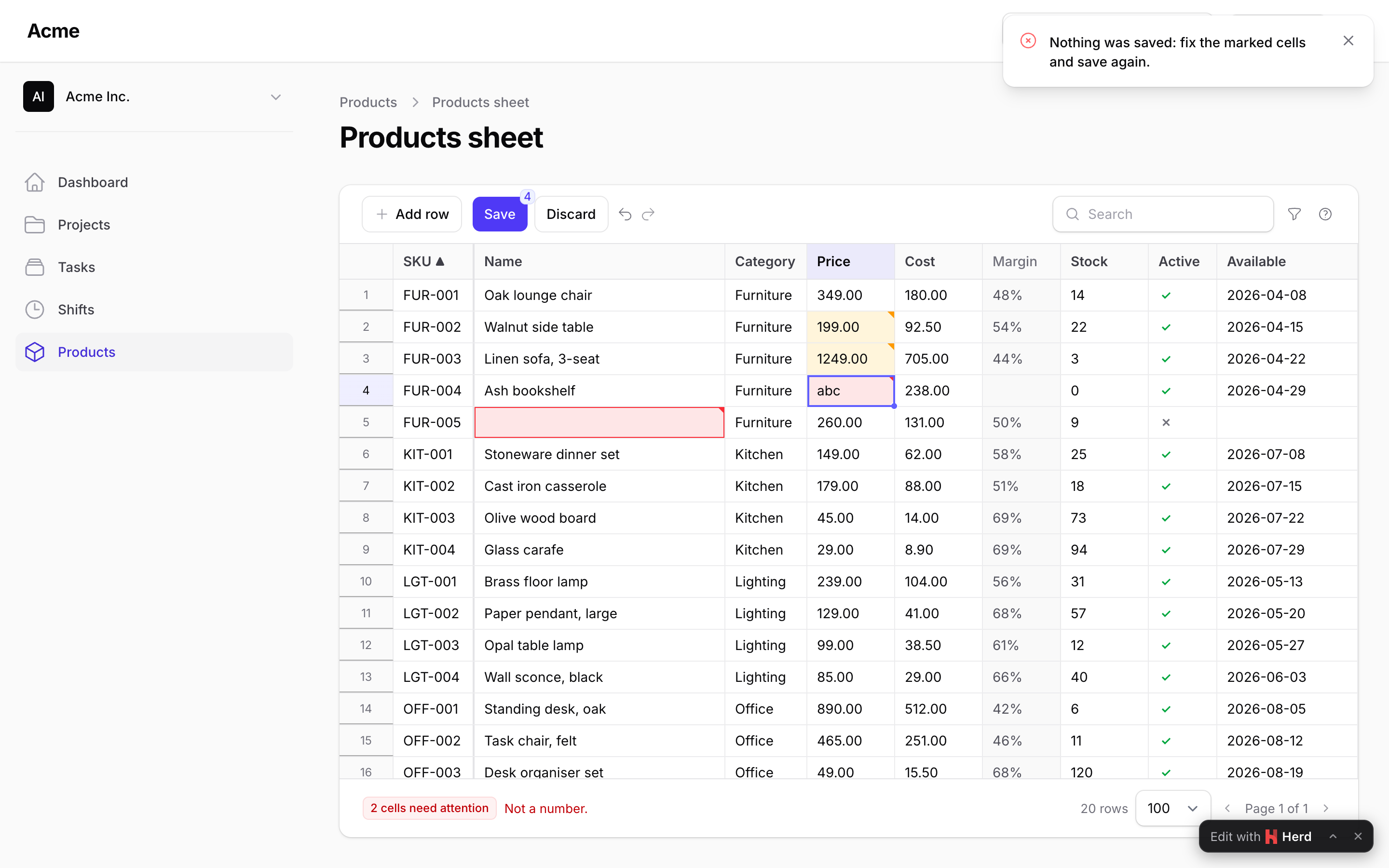
AllOrNothing rolls everything back on one refused row (a rule, a policy, a conflict, a database error); every error of every row still comes back, so the user fixes them all and saves once more. A row the database refuses (a NOT NULL column without a required rule, a delete blocked by a foreign key) is marked like any other ("This row could not be saved." / "This row could not be deleted.") and the exception is reported; the rows after it are still checked, and the batch rolled back at the end. Right for data that must stay consistent as a set (prices and their costs, a schedule).
PerRow keeps the good rows: a row the database refuses is rolled back to its savepoint, reported and marked the same way, the others are committed with the batch, and stay in the sheet only if refused. Right for long lists where one bad cell should not hold up the rest. An exception after the rows (afterSave()'s) still rolls the whole batch back, so the answer "The save did not go through." is always true.
In both modes a batch larger than max_rows_per_save (2,000 by default) is refused before anything is read, and a row carrying more cells than twice the sheet's columns is refused with one row message rather than an error per key.
Conflicts
When a conflicting cell's value on the server is still the one the user loaded (someone changed another cell of that row), the line under the grid says so instead of showing two equal values. Every row the browser loads carries a version: the raw value of updated_at (or the column named by versionColumn() / the config's version_column, a lock_version integer for instance). A save sends, per changed row, the version the user saw. When it differs from the current one — someone else saved the record meanwhile — the row is refused as a conflict: the cell turns purple and shows the other user's value next to yours. Saving again wins (the browser now has the current version); undoing the cell keeps theirs.
The check is the server's: a changed row that arrives without its version while the record has one is refused as a conflict too (the sheet always sends the versions it loaded, so such a payload did not come from it), never written. ->versionColumn(false) turns the check off: the last write wins. A model without timestamps has no version and behaves the same. updated_at has whole seconds, so two saves within one second are told apart only with a dedicated version column.
Refusing a save
beforeSave() runs before anything is written and may throw SaveRejected with a message the user sees; afterSave() runs inside the transaction in both modes (an exception rolls the save back; a SaveRejected shows its message, anything else a generic one). A database refusal while writing a row lands on that row (see above); any other exception (a model observer's, a hook's) is reported to the exception handler and answered with "The save did not go through.": an exception's text is for the log, never for the notification.
When the request fails
A save that does not reach the server, or comes back as an error page (the connection dropped, a 419 after the session expired, a 500 or 502 from a proxy), changes nothing in the browser: every unsaved cell, new row and deletion stays, the undo history too, the sheet says "Could not reach the server. Your changes are still here." and takes edits again. Save once more when the connection is back: the same batch is sent, with whatever was edited since. The same goes for a page of rows that fails to load: the rows on screen stay, the pager, the sort arrow and the page size go back to what those rows are, and the next sort, search or page asks again.
This holds on both Filament lines. Livewire 4 (Filament 5) rejects the call; Livewire 3 (Filament 4) leaves it unanswered and only reports the failed request, which the sheet listens for.
Deleting through the API
spreadsheetDelete(ids) on the component and Spreadsheet::delete(ids) on the definition delete by key through the same checks as a Save (deletable(), the policy, the save mode). The toolbar itself marks rows and deletes them with the next Save, so a deletion can be undone until then.