Moving and resizing
What happens on a drag
- The bar follows the pointer, snapped to the unit (whole days by default), and a hint shows the dates it would get. Dragging the body keeps the duration; dragging an edge changes it, within
minDuration()andmaxDuration(). Near the chart's start or end edge the chart scrolls, faster the closer the pointer, and the bar keeps following. Escape puts the bar back and sends nothing. A bar too narrow for its two resize handles (a one-day bar at the month scale) has none: grabbed anywhere, it moves; resize it from the keyboard or zoom in. - On release the bar stays where it was dropped, marked as pending, and the browser asks the server (
ganttMove, a renderless Livewire call: nothing is re-rendered). - The server loads the record through the chart's
query(), snaps the dates again and checks the rules below. - Your move logic runs (by default: write the start and end attributes and save).
- The server answers with the bar as it looks now; the bar flashes once. If anything refused the move, the bar slides back and the reason is shown as a notification.
Read-only charts (->readOnly(), the widget's default) show no handles, and the server refuses moves anyway.
To another row
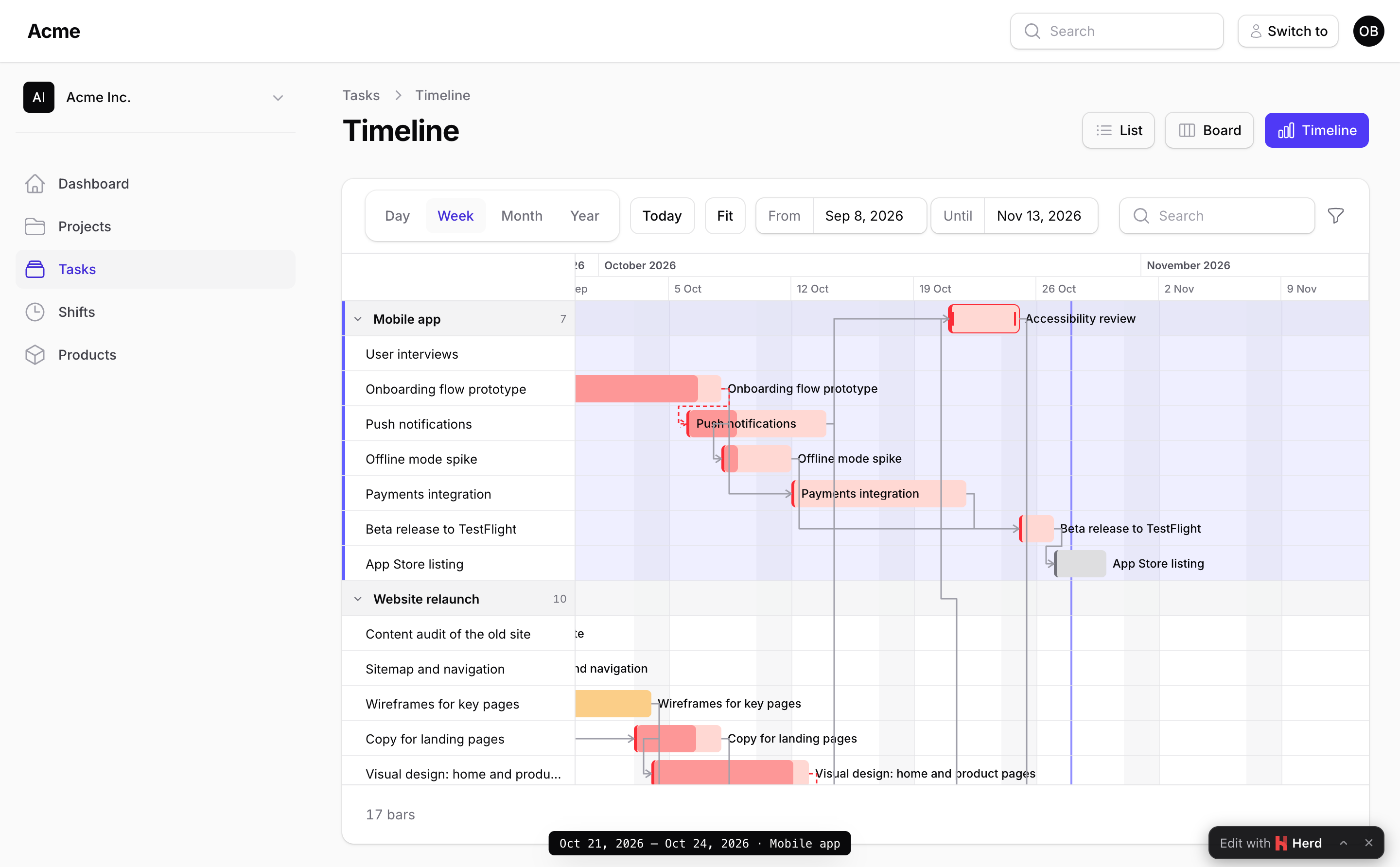
On a grouped chart a bar dragged up or down is carried to another group: the rows of the group under the pointer light up, the hint names it, and on release the bar lands there (and on its new dates, when it moved sideways too). The server writes the group column, or the BelongsTo's foreign key, in the same transaction as the dates. Only a row that is on the chart is a target: a group listed by groups(), a group that has a bar in the chart's query, or the ungrouped row when there is one; a related record that merely exists is refused. Dragging between rows is what a resource timeline is for: a booking to another room, a job to another machine, a task to another person.
->regroupable(fn (Booking $booking) => ! $booking->checked_in)       // may it change rows? default: whoever may move it
->canRegroup(fn (Booking $booking, ?string $room, ?string $previousRoom) => Room::find($room)->fits($booking) ?: 'That room is too small.')
A change of row alone asks regroupable() and canRegroup(), not movable(): the dates did not change. A chart grouped by a relation it cannot write (a HasOne, say), or not grouped at all, never offers it.
With rowBy(), the rows inside the groups are targets too: the row under the pointer lights up, and on release the bar's rowBy() column (or foreign key) is written with its dates. A row of another group changes both, when the group can be written; otherwise only the rows of the bar's own group are targets. Only a row on the chart is accepted: one listed in rows(), one a bar of the chart's query is in, or the unassigned row (which takes the bar off its row) while the chart shows it: a bar without a row is on the chart, or unassignedRow() keeps it there. Under a group that is a column or a BelongsTo, the row also has to show in the group the bar lands in: a row listed for one department is no row of another. regroupable() decides here too; canRegroup() is asked only when the group changes, and canMove(), moveUsing(), afterMove() get the new and the previous row after the groups. BarMoved has $row, $previousRow and isRowChange(). On a chart whose rows are parent tasks, a row is a record of the chart's query without a parent (or one a bar names as its parent), in the group that parent is in; there is no row for a task without a parent. With lineBy() on the same chart, a piece carried to another row carries its line. A parent's span is never carried to another row or group; dragged whole it takes its children along (moveChildrenWithParent()), every record through canMove(), moveUsing(), afterMove() and BarMoved as a move of its own.
A line of pieces
With lineBy(), the pieces of a split task share a row, and a drag follows the convention of Microsoft Project and most Gantt tools:
- The first piece carries the line. Dragging the earliest piece moves every piece of its line by the same amount, the ones outside the window included, so the gaps between them stay as they were. Whole days as soon as one piece is whole days.
- Any other piece moves alone, and every piece resizes alone.
- Another group carries the line. A piece dropped onto another group's rows takes its whole line there (shifted by the same amount when it moved sideways too): a line is one task, and never splits across two groups by a drag. A drop onto another line of the same group changes nothing but the dates.
- No merging. A piece dropped onto another piece of its line stacks into a lane, or, with
preventLineOverlap(), stops at its edge: joining two pieces would delete a record, and a drag never does that.
The keys work the same way: ←/→ on the first piece move the line, on any other piece that piece alone; ↑/↓ carry the line to the previous or next group. ->movePiecesAlone() turns the first rule off: the first piece moves alone like the others.
A line move is one request (ganttMoveLine). The server loads every piece of the line through the chart's query() and checks each one as a move of its own (movable(), the lock, canMove(), canRegroup()…) before it saves anything, so one piece that may not move refuses the whole line, with the reason and the piece's label (Review, on the same line: Nothing can be scheduled before Oct 14, 2026.). Then it saves every piece in one transaction, with a BarMoved event and an afterMove() call for each. The browser knows the rules too: when one piece of a line may not move (a locked past piece, say), dragging its first piece only changes its row, and when one may not change rows, no piece carries the line to another group. In code: $gantt->moveLine($id, '2026-10-12') moves the line of bar $id so that this bar starts on the 12th. The server holds to the same convention as the browser: along the days, a line moves from its first piece only, and not at all with movePiecesAlone() or in the compact layout; with a group (moveLine($id, '2026-10-12', $projectId)), any piece carries it.
On touch
A swipe always scrolls the chart, wherever it starts, so scrolling a phone screen never reschedules anything. To move a bar, press and hold it until it lifts (the device vibrates where it can), then drag. Held and lifted without moving, the bar opens its menu; a tap runs the click action.
From the keyboard
A bar is a focusable button. On a focused bar:
| Keys | Does |
|---|---|
| ← / → | Move the bar by one snap unit (mirrored right to left). |
| ↑ / ↓ | Carry the bar to the previous or next group (the focus follows it). |
| Shift + ← / → | Move its end (resize). |
| Alt + ← / → | Move its start (resize). |
| Enter, Space | The click action. |
| Escape | Before the move is sent: put the bar back. |
The bar moves at once; keys pressed in a row become one move, sent once they rest, through the same server checks as a drag. The new dates, or the reason a move was refused, are announced to screen readers, and the bar's accessible name ends with these keys. This is the keyboard and single-pointer alternative to dragging that WCAG 2.2 asks for (2.5.7 Dragging Movements).
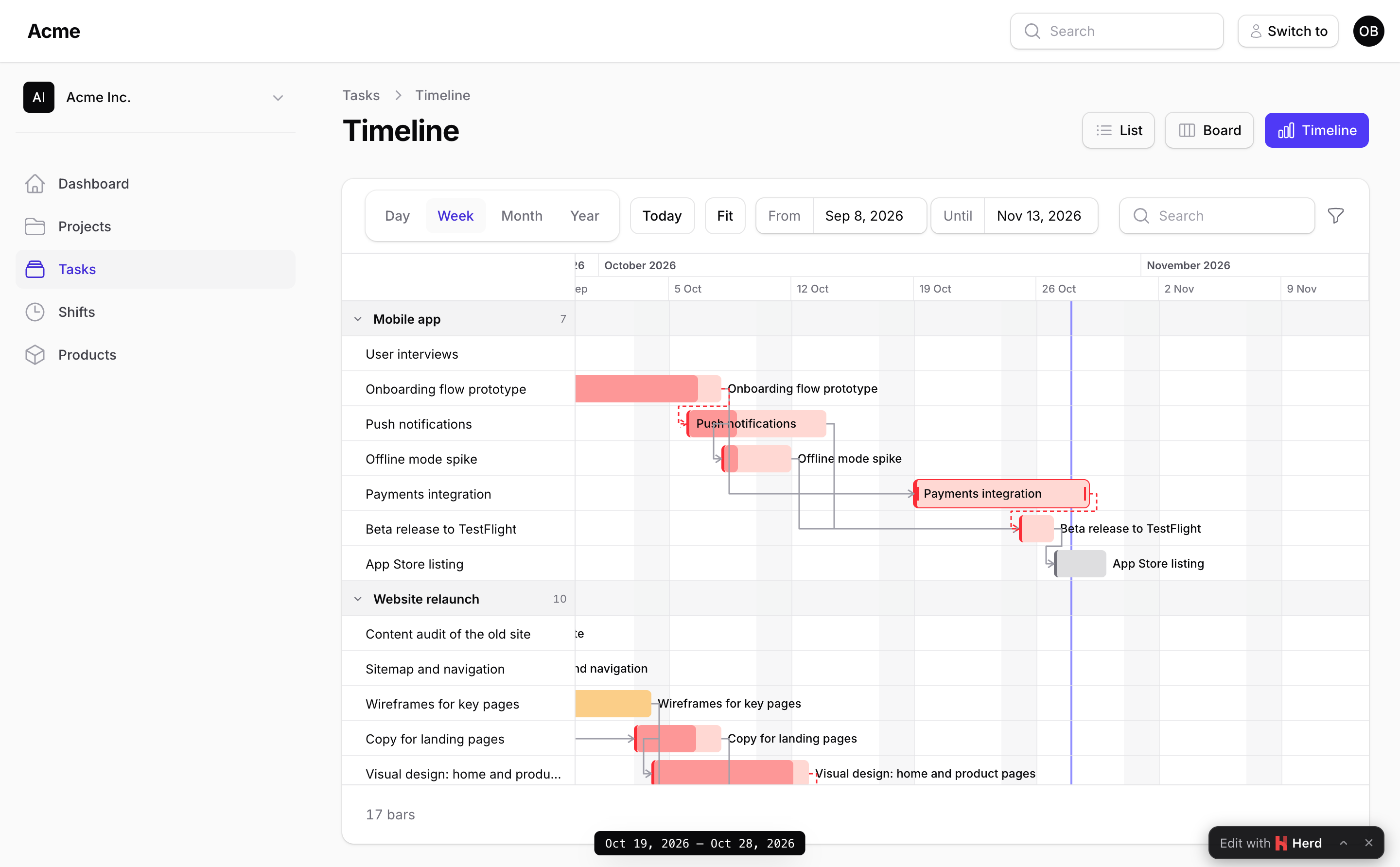
Snapping
use Packstub\Gantt\Enums\Unit;

->snapTo(Unit::Day)    // default: whole days
->snapTo(Unit::Hour)   // datetime records
A whole-day record (a date cast) has no hours to move: it moves by whole days, whatever snapTo() says. Snapping is relative to where the bar was: the distance dragged is rounded to whole units and the time of day is kept, so a shift at 08:00 dragged by a day is still at 08:00 with the default unit, and a bar that started at 09:30 keeps its half hour when dragged by the hour. The browser snaps while dragging and the server snaps what it receives the same way, so a crafted request cannot store a move the chart would not draw.
Time zones
The chart is naive: it works in wall-clock time and never converts. Every moment on the server side (a record's dates, what the browser sends, lockedBefore(), the window) is read as a wall-clock time and tagged UTC, whatever app.timezone is. A whole day is always 1440 minutes, so a three-day bar dragged across a daylight-saving change is still three days long, and a move is never mistaken for a resize because an hour went missing overnight.
The CarbonImmutable instances handed to canMove(), moveUsing(), afterMove() and the BarMoved event carry that same wall-clock time, tagged with the app's timezone (app.timezone), the way Eloquent tags a record's dates. So they read naturally: $start->isPast(), $start < now(), $end->lte($task->deadline), and writing one back with $task->update(['starts_on' => $start]) stores the wall clock unchanged. Only the chart's own maths (snapping, durations, the lock) stays on UTC-tagged copies. One edge case: a datetime record sitting exactly inside the hour a spring-forward change skips has no valid wall-clock time in the app's zone, so its copy lands an hour later; Eloquent saves that hour forward as well, whichever path writes it (the default save or your moveUsing()), since a datetime cast resolves the missing wall-clock time the same way.
Who may move
authorizeMoves() says who may move and resize a record from the chart; movable() and resizable() below say what may change. By default a move needs the model policy's update ability, when the model has a policy with an update method. On a GanttResourcePage it needs the resource's canEdit($record), which asks the same policy unless your resource says otherwise. A record the user may not update is drawn locked and its moves are refused on the server.
->authorizeMoves(fn (Task $task) => auth()->user()->can('reschedule', $task))
->authorizeMoves(true)   // anyone who sees the chart
Moves are the only thing authorized by default outside a resource. On a GanttPage, a GanttWidget or your own component, Filament's EditAction and DeleteAction in barActions() run for anyone who can open the page unless the action says what it needs, or the chart sits on a GanttResourcePage, where the resource's policy applies (Actions):
EditAction::make()->authorize('update'),
DeleteAction::make()->authorize('delete'),
Rules
Every rule takes a boolean or a closure that receives the record, and is checked on the server whatever the browser sent:
->movable(fn (Task $task) => $task->status !== 'done')       // may the bar change its dates?
->resizable(fn (Task $task) => ! $task->is_fixed_length)     // may its edges move?
->minDuration(days: 1)                                        // default: one snap unit
->maxDuration(days: 30, hours: 0)
->lockedBefore(today())                                       // or fn () => now()->startOfMonth()
->regroupable(fn (Task $task) => $task->status !== 'done')  // may the bar change rows (groups)?
->canMove(function (Task $task, CarbonImmutable $start, CarbonImmutable $end, CarbonImmutable $previousStart, CarbonImmutable $previousEnd, ?string $group, ?string $previousGroup) {
    return $start->isWeekend() ? 'Not on a weekend.' : true;
})
->canRegroup(fn (Task $task, ?string $group, ?string $previousGroup) => $group !== null)   // not to the ungrouped row
| Rule | Refuses |
|---|---|
readOnly() |
Everything. |
authorizeMoves() |
Any move or resize by a user it does not allow (default: the policy's update). |
movable() |
A change of position (same duration), any move of a milestone, and a change of both edges together with the duration (that is a move as well as a resize, so it needs both). |
resizable() |
A change of duration, from either edge. Milestones are never resizable. |
regroupable() |
A change of row (a group, or with rowBy() a row). A row that is not on the chart is refused whatever this says. |
minDuration() / maxDuration() |
A resize that makes the bar shorter or longer than that. The browser knows the bounds too and stops the handle there. |
lockedBefore($moment) |
A start moved to before the moment, a start that was already before it, an end moved to before it, or any change to a bar that ended before it (its dates and its row: the past stays as it happened). A bar still running at the moment may change its end, and its row. A milestone on the moment itself is not past. The browser knows: a bar that ended before the moment is drawn locked, one that started before it has only its end handle. The message names the moment: a date for a midnight lock (today()), date and time otherwise (now()). |
canMove() |
Whatever the closure says: false refuses with a generic message, a string refuses with that message. After the dates come the new and the previous group key (null when ungrouped, or not grouped), then with rowBy() the new and the previous row key. |
canRegroup() |
The same, for a change of row only, with the record, the new and the previous group key. |
preventLineOverlap() |
With lineBy(): a move or a resize that makes a piece overlap another piece of its line (pieces that touch are fine), and a new or edited piece whose form dates do (the modal stays open and says why). A whole line moving keeps its pieces apart, and a change of row alone changes no dates: neither is asked. The browser stops a drag at the neighbouring piece and shows a drag-to-create selection red while it overlaps one. |
| keepInsideParent() | On a chart whose rows are parent tasks, with the parent's own dates: a child moved or resized to outside its parent's dates, or carried to a parent whose dates do not hold it, and a parent shrunk or moved alone past one of its children. Moving a parent with its children is never refused by this. |
| preventRowOverlap() | With rowBy(): a move, a resize or a change of row that makes a bar overlap another bar of the row it ends up in, in any group, and a new or edited bar whose form dates or row do. The browser stops a drag at the next bar of the row, turns another row red while the bar is over one of its bars (a release there puts the bar back) and shows a selection red while it overlaps one. A bar without a row is never checked. |
preventLineOverlap() checks the chart's own moves and forms. For your other forms (the resource's edit page, an import), ask the chart with the record holding the new values: $gantt->overlapsOnLine($task) is true when its dates overlap another piece of its line, $gantt->overlapsOnRow($job) when they overlap another bar of its row.
The dates a closure receives are the chart's half-open range: a whole-day record's end is the day after its last day (Bars), as wall-clock moments in the app's timezone (Time zones), so $start->isPast() means what it says.
Your own move logic
moveUsing() replaces the default save. Throw MoveRejected to refuse the move: the bar goes back and the message is shown. After the dates it receives the new and the previous group key (?string), then with rowBy() the new and the previous row key, so a closure that writes the record itself writes the group and the row too when they differ.
->moveUsing(function (Task $task, CarbonImmutable $start, CarbonImmutable $end) {
    $task->update(['starts_on' => $start, 'ends_on' => $end->subDay()]);
    $task->children()->each(fn (Task $child) => $child->shiftBy($start->diffInDays($task->starts_on)));
})
Throw Packstub\Gantt\Exceptions\MoveRejected to refuse with a message you want shown as-is. Any other exception (the database's, a bug in the closure) is reported to your exception handler and the user sees "The change did not go through.": an exception's text, a query with its bindings say, belongs in the log, not in a notification. Gantt::move() itself lets such an exception propagate, so a call of your own sees it.
use Packstub\Gantt\Exceptions\MoveRejected;

->moveUsing(function (Booking $booking, CarbonImmutable $start, CarbonImmutable $end) {
    throw_if($booking->isLocked(), new MoveRejected('This booking is locked.'));

    $booking->update(['check_in' => $start, 'check_out' => $end]);
})
After a move
afterMove() runs after a saved move, with the same arguments as moveUsing(). The save (or your moveUsing()), the BarMoved event, afterMove() and the bar sent back run in one database transaction on the model's connection: when afterMove() or a listener throws, the save is undone, so the bar going back in the browser matches the database. Throw MoveRejected from afterMove() to refuse with a message. Work that must not be undone, or must not run for a move that is (mail, a call to another service), belongs in a queued listener.
->afterMove(fn (Task $task, CarbonImmutable $start, CarbonImmutable $end, CarbonImmutable $previousStart) =>
    activity()->performedOn($task)->log("Rescheduled from {$previousStart->toDateString()} to {$start->toDateString()}"))
The chart also dispatches a Laravel event:
use Packstub\Gantt\Events\BarMoved;

Event::listen(function (BarMoved $event) {
    // $event->record, $event->previousStart, $event->previousEnd, $event->start, $event->end
    // $event->previousGroup, $event->group (keys, null when ungrouped)
    // $event->isResize(), $event->isRegroup(), $event->gantt (the chart's key())
});
On the page itself, override ganttMoved(string $id, array $bar) to react in the component. In the browser, a gantt-bar-moved event bubbles up from the chart with { id, bar }.
Refreshing from outside
Dispatch packstub-gantt-refresh (from Livewire, $this->dispatch('packstub-gantt-refresh'), or from JavaScript on window) and the chart reloads its bars with the current window and filters. Actions run from the chart do it for you; refreshOn(['task-updated']) does it for your own events (Filters and the time window).