Themes
The bundled themes
| Id | Theme | Feel | Preferred mode |
|---|---|---|---|
aurora |
Aurora | Iridescent glass surfaces, a floating dock-style sidebar, sky and cyan accents with a blush edge. "Daybreak" in light mode, "Twilight" in dark. | Light |
midnight |
Midnight | Deep near-black surfaces with a violet-to-cyan accent gradient on primary actions and stat values. In light mode it keeps the palette and shapes on Filament's standard surfaces. | Dark |
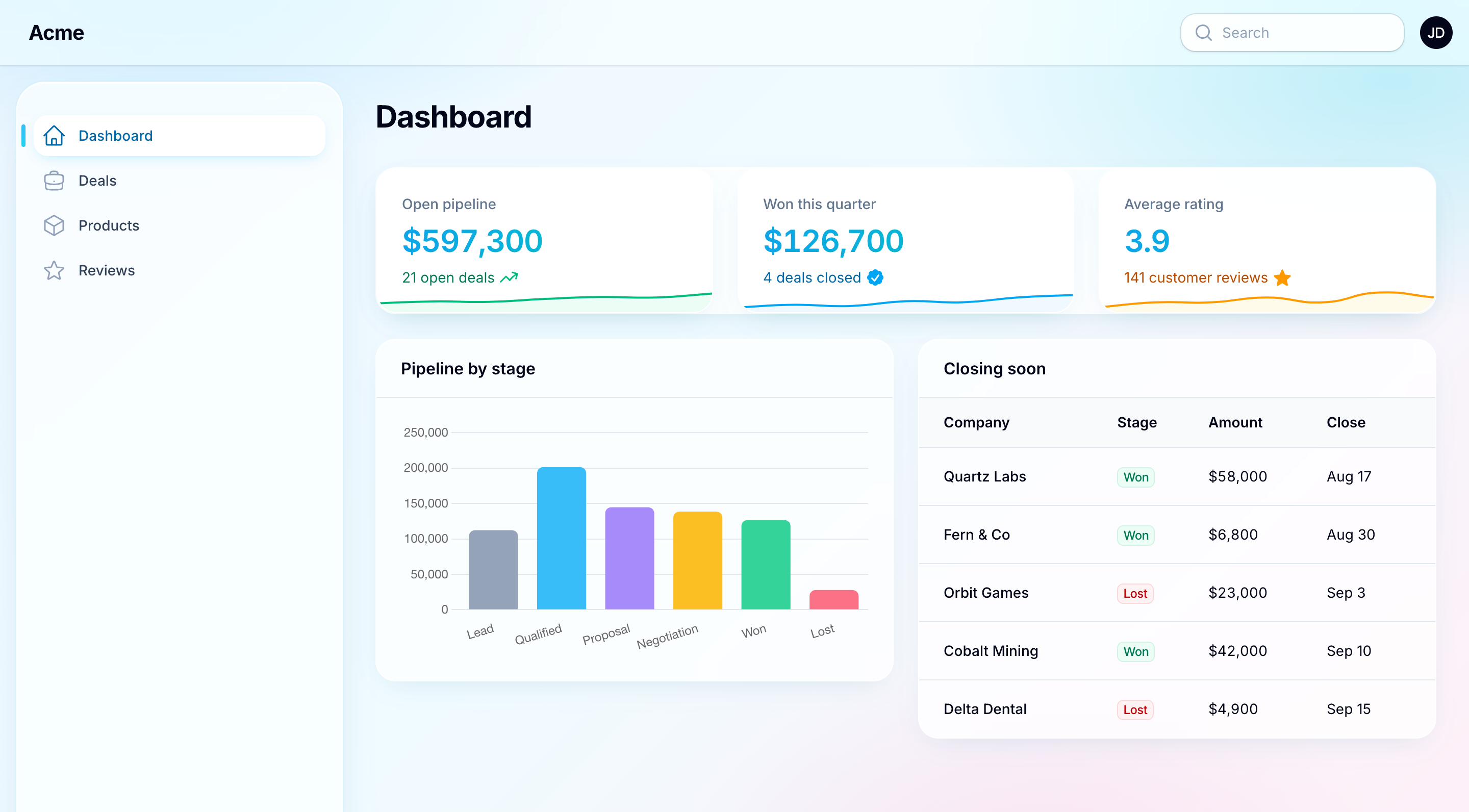
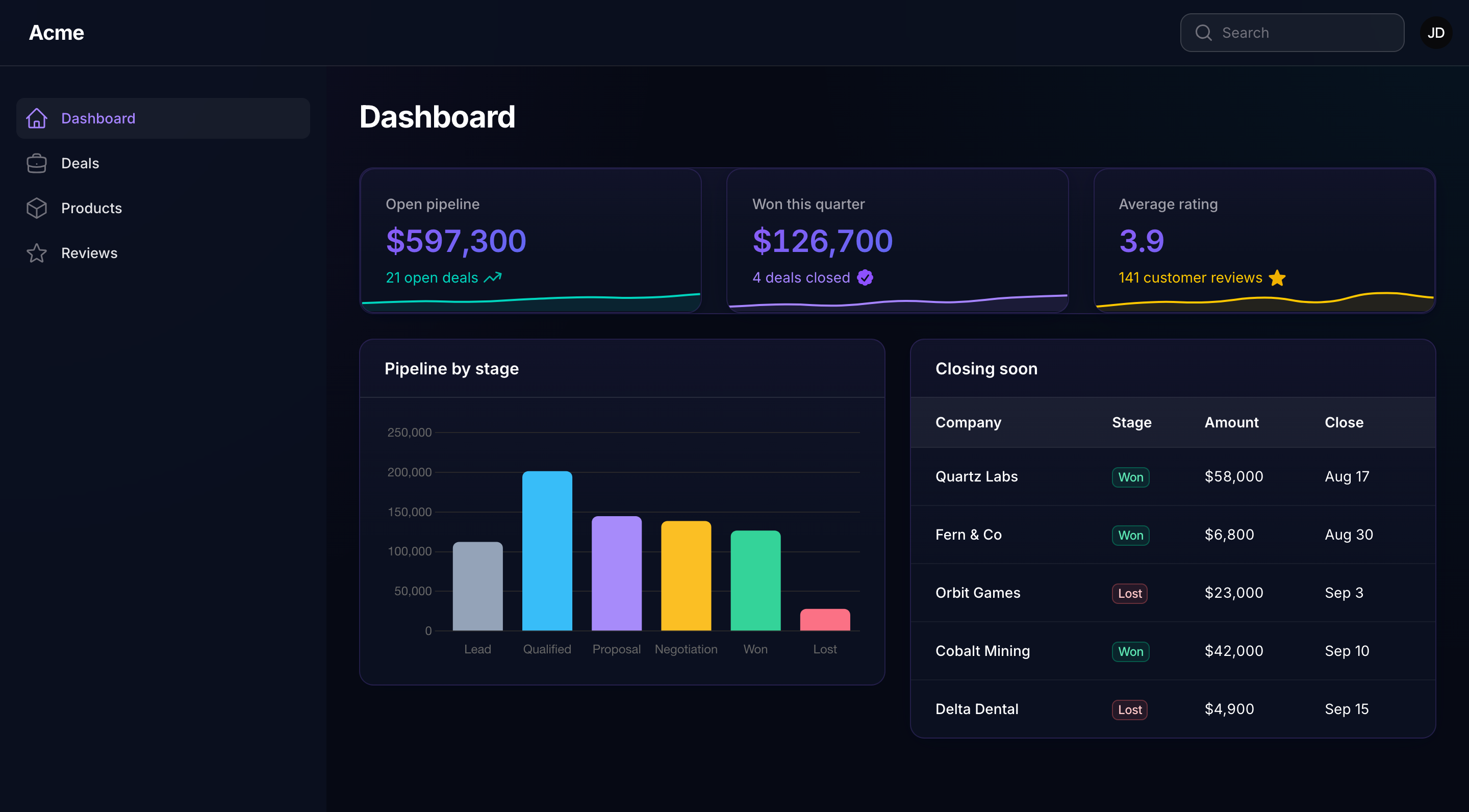
Both are ordinary theme classes, Packstub\Nitpick\Themes\Aurora and Packstub\Nitpick\Themes\Midnight, and can be referenced by class or id.
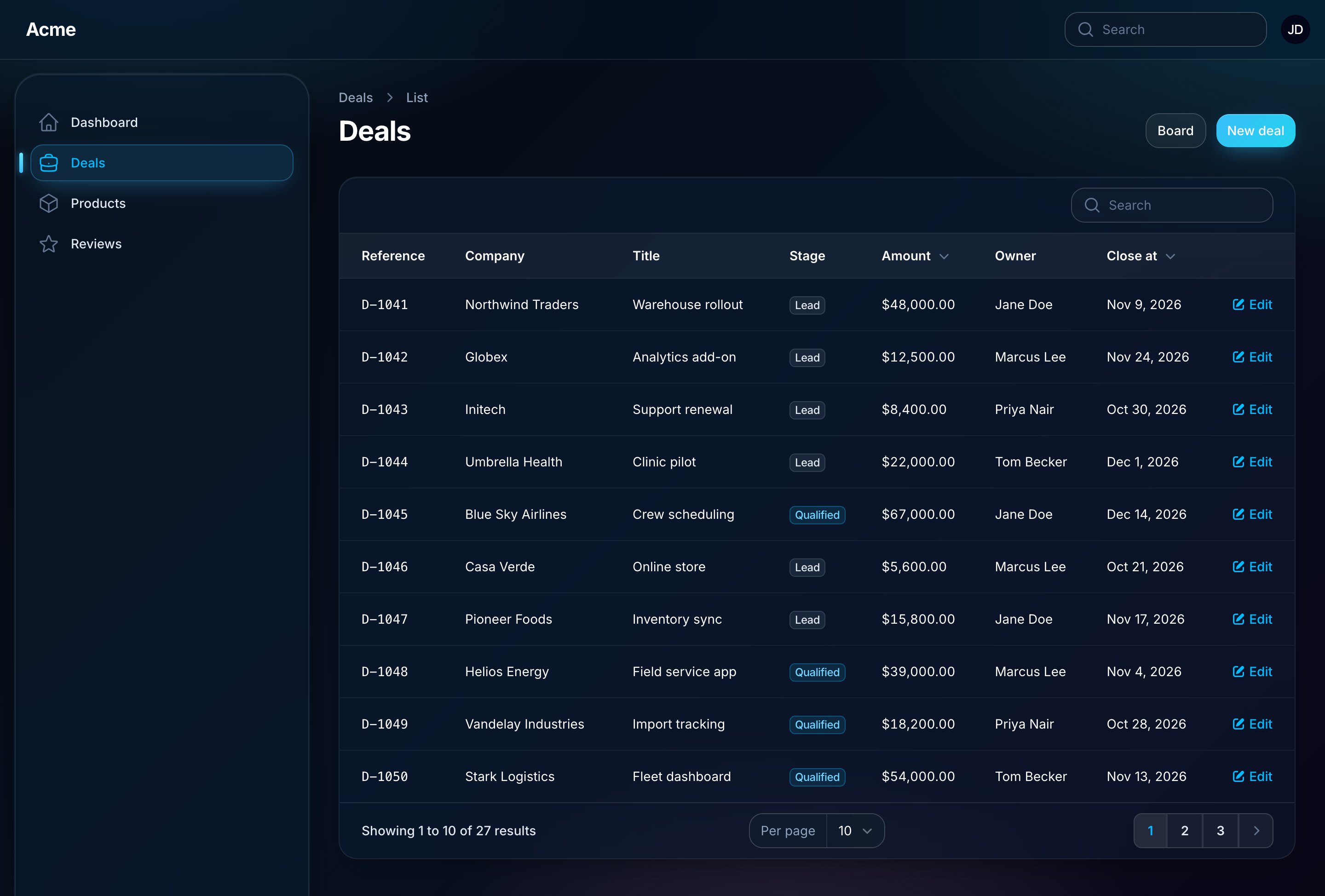
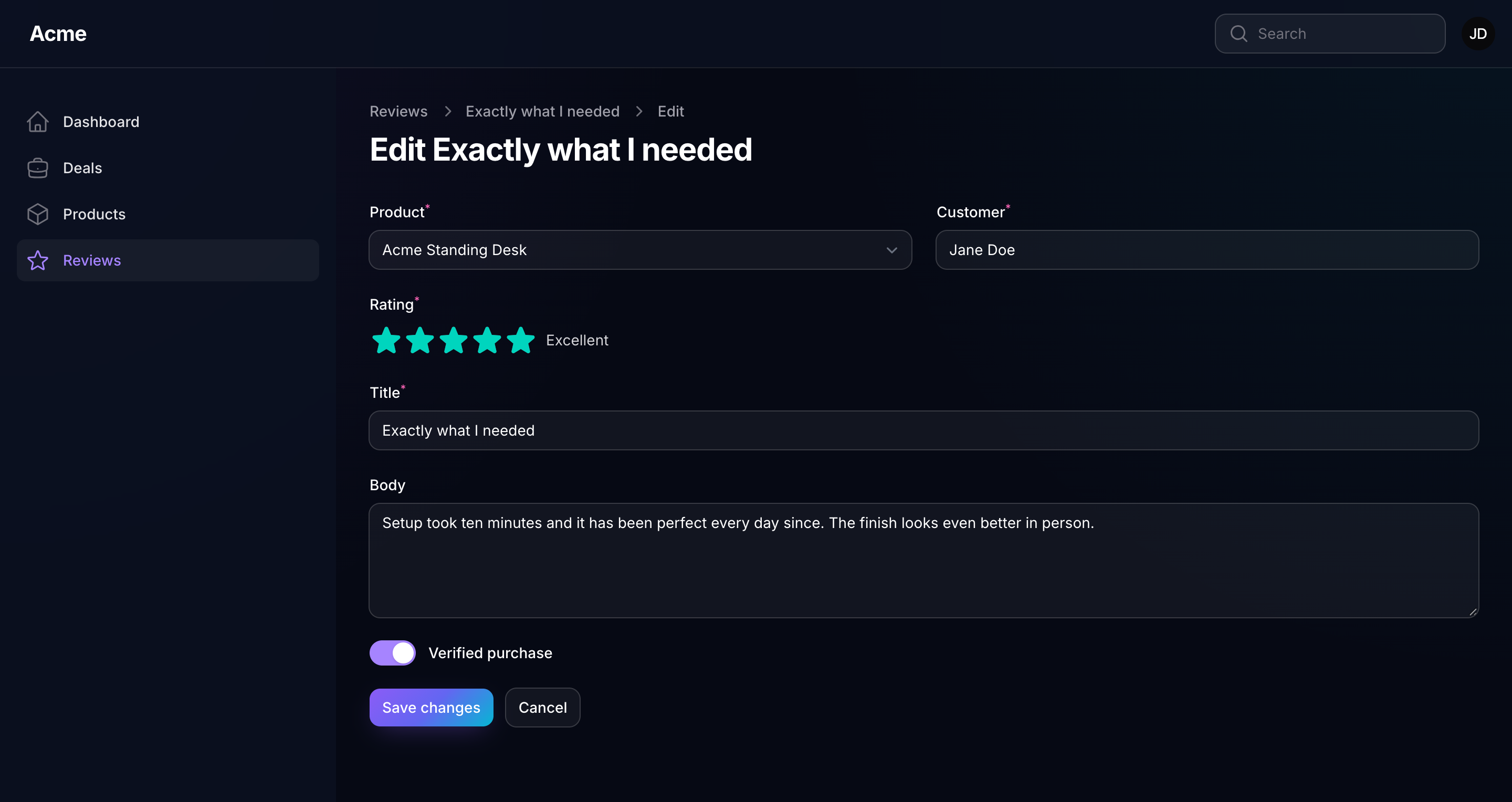
Each covers both modes. Aurora in dark mode, and Midnight on a form:
Preferred mode
A theme declares the light/dark mode it is designed for. While the theme is active, that mode becomes the panel's default: the one a visitor sees before they ever touch the toggle. A user who has toggled light or dark keeps their choice across themes and page loads; the plugin never overwrites it on load. When a user picks a theme in the Appearance page, the picker adopts that theme's preferred mode once, because that is a deliberate choice.
->forceMode() on the plugin, or force_mode in the config, replaces the theme's preference for the whole panel.
Themes from the Filament plugin directory
The Filament plugin directory has a growing shelf of themes, free and paid, each with a character of its own. Any of them can sit in the picker beside the bundled ones, so a panel offers as many looks as you care to install.
Install the theme's package the way its own docs describe, then hand its plugin to a theme:
use Noreviq\FilamentTheme\NoreviqThemePlugin;
use Packstub\Nitpick\Facades\Themes;
use Packstub\Nitpick\Theme;

// AppServiceProvider::boot()
Themes::register(
    Theme::make('noreviq')->plugin(fn () => NoreviqThemePlugin::make()),
);
Run php artisan filament:assets and the theme is registered like any other: a panel can make it the default and offer it to users.
- The plugin joins the panel while its theme is active, and only then, so it styles the panel exactly as its own docs describe: palette, stylesheets, fonts, render hooks, layout. While another theme is active, nothing of it is on the page.
- Do not add the plugin to the panel as well: the theme takes its place.
- Configure the plugin the way its docs say, inside the closure (
NoreviqThemePlugin::make()->corners(...)), and the theme follows. - The picker shows the theme's swatches from the plugin's colours. Picking it reloads the page, so the panel is built with the plugin from the start.
- Register as many as you like, one
Theme::make()each, and add->label()or->description()for the text on its card.
Example: installing an open-source theme
Noreviq, a teal and graphite theme by Yousef Al-Jallad, ships ready-made CSS, so it takes three steps.
-
Require the package:
composer require noreviq/filament-theme -
Register it as a theme, in
AppServiceProvider::boot():use Noreviq\FilamentTheme\NoreviqThemePlugin; use Packstub\Nitpick\Facades\Themes; use Packstub\Nitpick\Theme; Themes::register( Theme::make('noreviq') ->description('Teal and graphite with sharp corners.') ->plugin(fn () => NoreviqThemePlugin::make()), ); -
Publish the assets:
php artisan filament:assets
Open the Appearance page: Noreviq is a card beside Aurora and Midnight. To make it the look everyone starts with, set ->default('noreviq') on the plugin.
Themes that build with Vite
Some themes are Tailwind source, compiled by your app's Vite build. Follow the build step from the theme's own docs, and the stylesheet is linked from the build while the theme is active.
A theme that sets a Vite theme on its panel. Abyss, by Osama Nagi, asks for its stylesheet in vite.config.js:
// vite.config.js
laravel({
    input: [
        'resources/css/app.css',
        'resources/js/app.js',
        'vendor/osamanagi/filament-abyss-theme/resources/css/theme.css',
    ],
}),
composer require osamanagi/filament-abyss-theme
npm run build
use Nagi\FilamentAbyssTheme\FilamentAbyssThemePlugin;

Themes::register(
    Theme::make('abyss')->plugin(fn () => FilamentAbyssThemePlugin::make()),
);
The plugin sets its Vite theme on the panel while it is active, so that is all.
A theme imported into a Filament theme file. Nord, by Andréia Bohner, asks for an @import in a custom Filament theme. Give it a file of its own, so it is compiled apart from your panel's stylesheet:
/* resources/css/themes/nord.css */
@import '../../../vendor/filament/filament/resources/css/theme.css';
@import '../../../vendor/andreia/filament-nord-theme/resources/css/theme.css';
Add resources/css/themes/nord.css to the input array in vite.config.js, run npm run build, and name the entry on the theme with the vite: prefix:
use Andreia\FilamentNordTheme\FilamentNordThemePlugin;

Themes::register(
    Theme::make('nord')
        ->plugin(fn () => FilamentNordThemePlugin::make())
        ->stylesheet('vite:resources/css/themes/nord.css'),
);
The plugin supplies the palette; the compiled file supplies the look. A vite: stylesheet works for your own Tailwind-built theme too.
A theme without a plugin class
A theme that is a palette, or a palette and a few rules, needs no plugin to read from. Shadcn, by Openplain, is a set of colour constants:
use Openplain\FilamentShadcnTheme\Color as ShadcnColor;

Themes::register(
    Theme::make('shadcn')->colors(['primary' => ShadcnColor::Default]),
);
A package like this may style every panel from its service provider. To keep those rules to its own theme, save them as a CSS file, pass it to ->stylesheet(), and list the package under extra.laravel.dont-discover in composer.json.
A theme that changes the layout
Some theme plugins set more than colours and stylesheets: Press, by Elemind, moves navigation into a top rail and sets a prebuilt Filament theme when its plugin boots. ->plugin() covers that too, since the plugin is on the panel while its theme is active:
use Elemind\PressFilamentTheme\PressFilamentTheme;

Themes::register(
    Theme::make('press')
        ->description('An editorial look with navigation along the top. Open source, by Elemind.')
        ->plugin(fn () => PressFilamentTheme::make()),
);
The same goes for a theme that styles the panel from render hooks, like DaisyUI Themes. To change the panel further while the theme is active (top navigation, a font of your own), add ->panel(); Configuring the panel has the details, and what cannot be added this way.
Building a theme plugin of your own? For theme authors has the habits that make it work well here.
Offering themes on a panel
By default a panel offers every registered theme. Narrow it:
use Packstub\Nitpick\Themes\Aurora;
use Packstub\Nitpick\Themes\Midnight;

NitpickPlugin::make()
    ->themes([Aurora::class, Midnight::class, 'ocean'])
Entries may be class names, ids or instances. The list can be a closure, evaluated per request. A theme that is registered but not listed cannot be picked or set on that panel.
The default
NitpickPlugin::make()->default(Midnight::class)
Resolution order: the plugin's ->default(), then the default config key, then the first offered theme. A ->default() that names a theme the panel does not offer throws, so a typo is caught at boot rather than showing the wrong look.
Following the tenant
The default may be a closure. It runs when the panel boots on each request, so it can read the current tenant, the user's team or anything else in scope:
use Filament\Facades\Filament;

NitpickPlugin::make()
    ->default(fn (): string => Filament::getTenant()?->theme ?? 'aurora')
A user's own choice still wins over the tenant default when user selection is on.
One theme, several panels
Each panel registers its own plugin instance, with its own offer and default:
// Admin panel
->plugin(NitpickPlugin::make()->default(Midnight::class)->picker())

// Customer panel
->plugin(NitpickPlugin::make()->themes([Aurora::class])->default(Aurora::class))
A user who chose Aurora in the admin panel is unaffected in the customer panel: choices are stored per panel.
Continue with User preferences.