Tables and charts
An answer that says "here are the 37 orders waiting for a call" and then renders the real Orders table under itself is more useful than one that types 37 rows. That is what show-table does, and it works from your resources.
AgentResource
A Filament resource opts in by implementing the AgentResource contract. The InteractsWithAgent trait gives it defaults derived from the resource itself:
use Packstub\Agents\Concerns\InteractsWithAgent;
use Packstub\Agents\Contracts\AgentResource;

class OrderResource extends Resource implements AgentResource
{
    use InteractsWithAgent;
}
| Method | Default from the trait | Override when |
|---|---|---|
agentKey() |
the resource slug with underscores (orders) |
you want a different name in the model's vocabulary |
agentSummary(Model $record, bool $full = false) |
id, the record title and the record's panel url |
the model should see domain fields (number, status, total); $full is for one record, compact for lists |
agentContextLabel(Model $record) |
the model label plus the record title ("Order RO-00012") | the label should read differently |
agentFilters() |
none | you want show-table and your search tools to accept filters |
agentRecordUrl() returns the view page, else the edit page, else the list, and is what the summary's url should carry so answers can link to records.
The package discovers every resource of the panel that implements the contract. Pass an explicit list with AgentsPlugin::make()->resources([...]) when you want fewer, or a different order.
Filters
agentFilters() returns the vocabulary the model may pass, as Filter objects that know their JSON schema, how to clean a value and how to narrow a query:
use Packstub\Agents\Filters\Filter;

public static function agentFilters(): array
{
    return [
        Filter::text('query')->description('Order number or customer.')
            ->apply(fn (Builder $q, string $text) => $q->where(fn ($w) => $w
                ->where('number', 'like', "%{$text}%")
                ->orWhereRelation('customer', 'name', 'like', "%{$text}%"))),
        Filter::enum('status', OrderStatus::class)->multiple()
            ->apply(fn (Builder $q, array $statuses) => $q->whereIn('status', $statuses)),
        Filter::flag('open_only')->description('Only orders that still need work.')
            ->apply(fn (Builder $q) => $q->whereIn('status', OrderStatus::open())),
        Filter::date('placed_from')
            ->apply(fn (Builder $q, string $date) => $q->where('placed_at', '>=', $date)),
        Filter::number('min_total')
            ->apply(fn (Builder $q, int|float $total) => $q->where('total', '>=', $total)),
    ];
}
| Constructor | Schema | Normalized value |
|---|---|---|
Filter::text($key) |
string | trimmed string |
Filter::enum($key, EnumClass::class or [...]) |
string with the allowed values (an array of them with ->multiple()) |
one value, or a list |
Filter::boolean($key) |
boolean | true or false; the closure runs for both |
Filter::flag($key) |
boolean | the closure only runs when true |
Filter::date($key) |
string, "YYYY-MM-DD" in the hint | the string |
Filter::number($key) |
number | int or float |
Empty values and unknown keys are dropped. ->description() becomes part of the hint the model reads.
The same vocabulary serves your search tools through AgentResources:
$filters = AgentResources::normalizeFilters('orders', (array) $request->get('filters'));
$query = AgentResources::apply('orders', Order::query(), $filters);
$schema = AgentResources::filterSchema($schema, 'orders');   // for the tool's schema()
show-table
Add Packstub\Agents\Mcp\Tools\ShowTable to the tool list. Its description and schema are generated from the resources: the table argument is an enum of the agent keys, filters is the union of every table's vocabulary (each key described per table), and title is an optional caption.
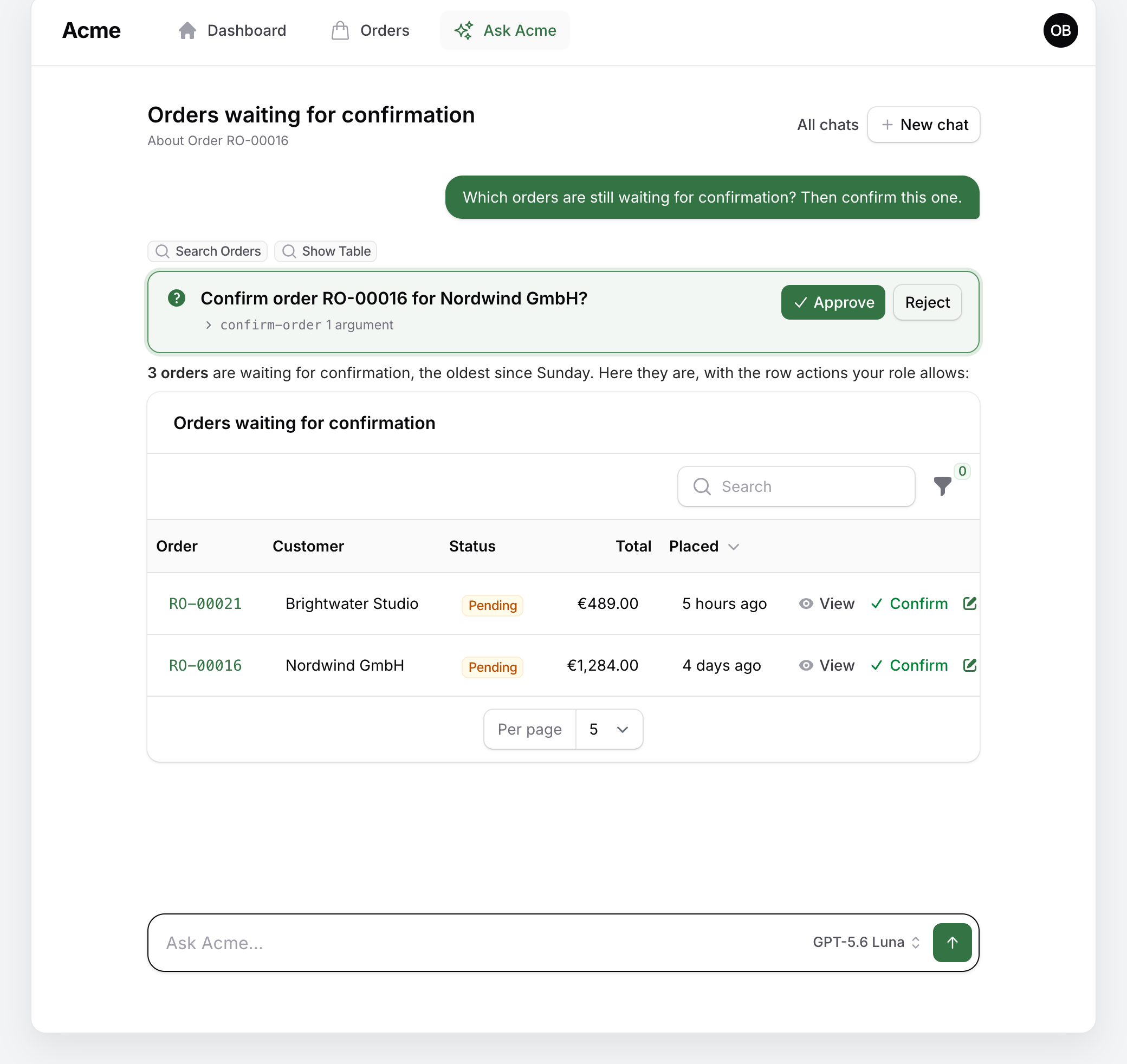
When the model calls it, the tool checks canViewAny() on the resource, normalizes the filters, counts the rows and returns the total plus a note telling the model that a table is rendered under the answer. The chat then embeds the resource's own table(), with the resource's query narrowed by the filters as the base query, so the person gets the same columns, formatting, sorting and row actions their role allows on the list page.
In an answer the table is compact: three pending orders are three rows, not a list page in a chat bubble. One header carries the caption the tool gave and the row count, the column titles are small, and there is no search box, filter button, bulk action or pager. Every row is there up to a cap of 25. A longer result shows its first 25 rows and a link, "Open all 37 in a full table", to a page of the panel (/agent-table/{resource}) where the same rows come with the list page's search, filters, pagination (ten a page) and bulk actions, under the caption as its title and a breadcrumb to the resource. The filters travel in the URL in the assistant's vocabulary and are normalized again on the way in, and the table runs the resource's own query, so the page shows nothing the person could not reach from the list page.
AgentsPlugin::make()
    ->embeddedTable(search: true, filters: true, limit: 50)
search and filters bring the resource's own search box and filter button back into the answer's table (they start hidden: the assistant chose the filters and the answer says what the table shows); limit is the cap. The tool tells the model which case it is in, so its sentence under the table can say "the first 25 of 37".
The generic answering rules tell the model to use show-table whenever someone wants to see or work through records ("show me", "list", more than a handful of rows) and to use the search tools when it needs the data itself.
In the chat, the answer is one or two sentences and the table does the rest:
Charts
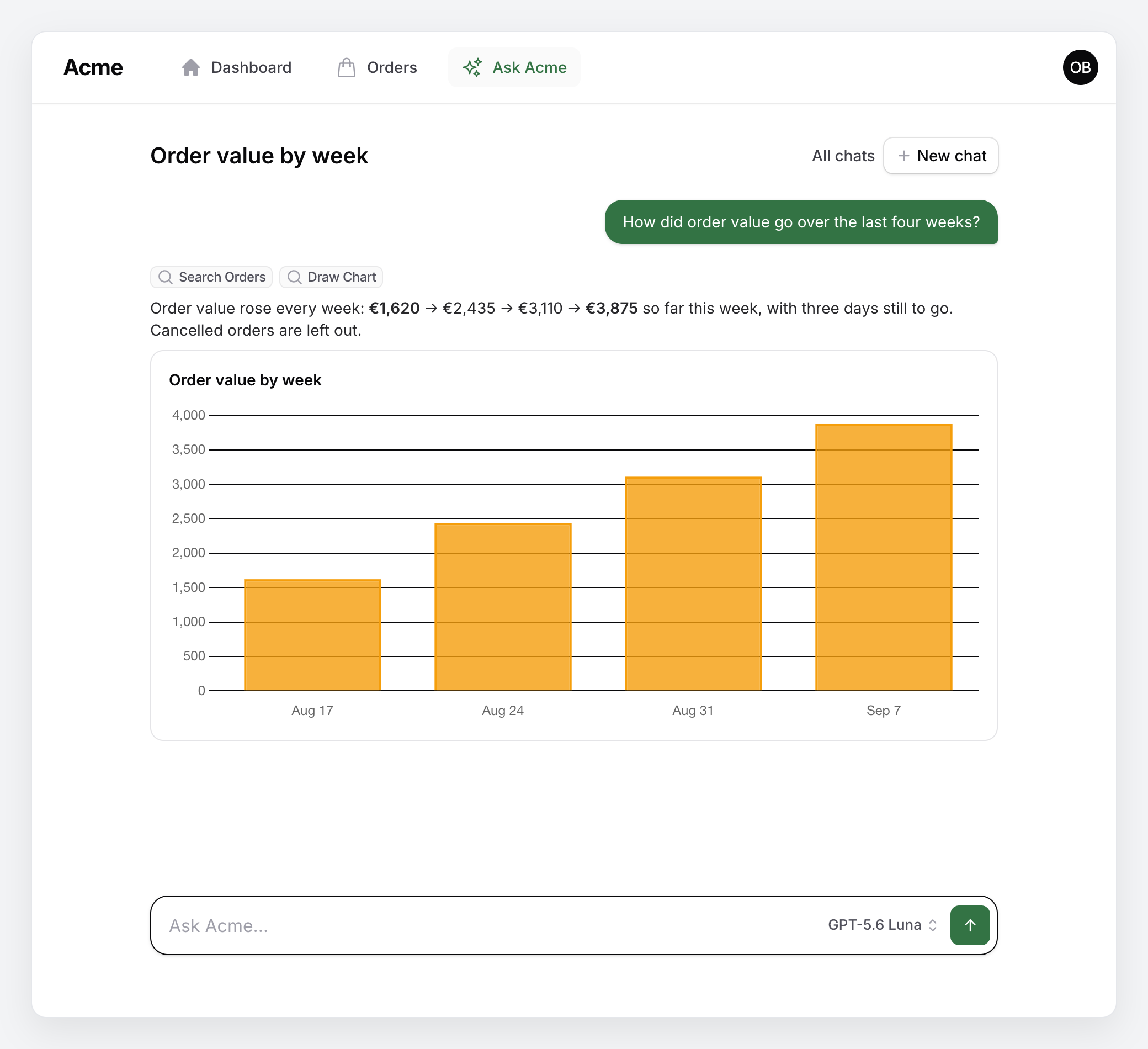
Packstub\Agents\Mcp\Tools\DrawChart renders a chart from numbers the model already retrieved with other tools:
| Argument | |
|---|---|
title |
required |
type |
bar (default), line, pie, doughnut |
labels |
1 to 60 strings |
datasets |
1 to 8 series of {label, data}; every series has one value per label |
The rules tell the model to pass only values that came from a tool result, never estimates. For anything over time, prefer a reporting tool of your own that returns a chart key next to its data (see Tools); the chat renders both the same way.
A chart from the model's own draw-chart call, with the numbers it took from search-orders:
Page context
The topbar "Ask …" button knows which page it is on. On a record page of a resource that implements AgentResource, it opens the chat with a context of orders/12, the chat shows "About Order RO-00012", and the dynamic prompt block carries the record's compact summary: "The person opened this chat from Order RO-00012. 'This one' / 'this record' means that record: {…}". The model calls a tool for anything beyond the summary.
The context stays with the conversation: it is recorded with every question asked under it, so the chat is still about the record after the redirect to the conversation's URL, after a reload, when it is reopened from the Chats page or in the slide-over on another page, and a follow-up there still reads the record's summary. The "About …" line links the record to its page (agentRecordUrl(): the view page, else edit, else the list).
PageContext::fromRequest() resolves the reference from the current route (a bound model, or a resource route with a record parameter); PageContext::resolve('orders/12') turns it back into the label and summary, PageContext::url('orders/12') into the record's page. Hide the button on pages that have their own composer with AgentsPlugin::make()->hideAskButtonOn(['*.pages.dashboard']); ->askButtonColor('gray') blends it in with the topbar's other actions (it is in the panel's primary colour by default, so it reads as the assistant).