MCP clients
The same tools the chat uses are served over HTTP as an MCP server, so Claude Code, Claude Desktop, Cursor or any client that speaks the Model Context Protocol can work inside the panel as the person who minted the token, in their workspace, with their role.
The Agent access page
AgentsPlugin registers an Agent access page (/agent-access) whenever agentAccess() is on (the default). Gate it with an ability and put it in a navigation group:
AgentsPlugin::make()->agentAccess(ability: 'setup.view', group: fn () => __('Setup'))
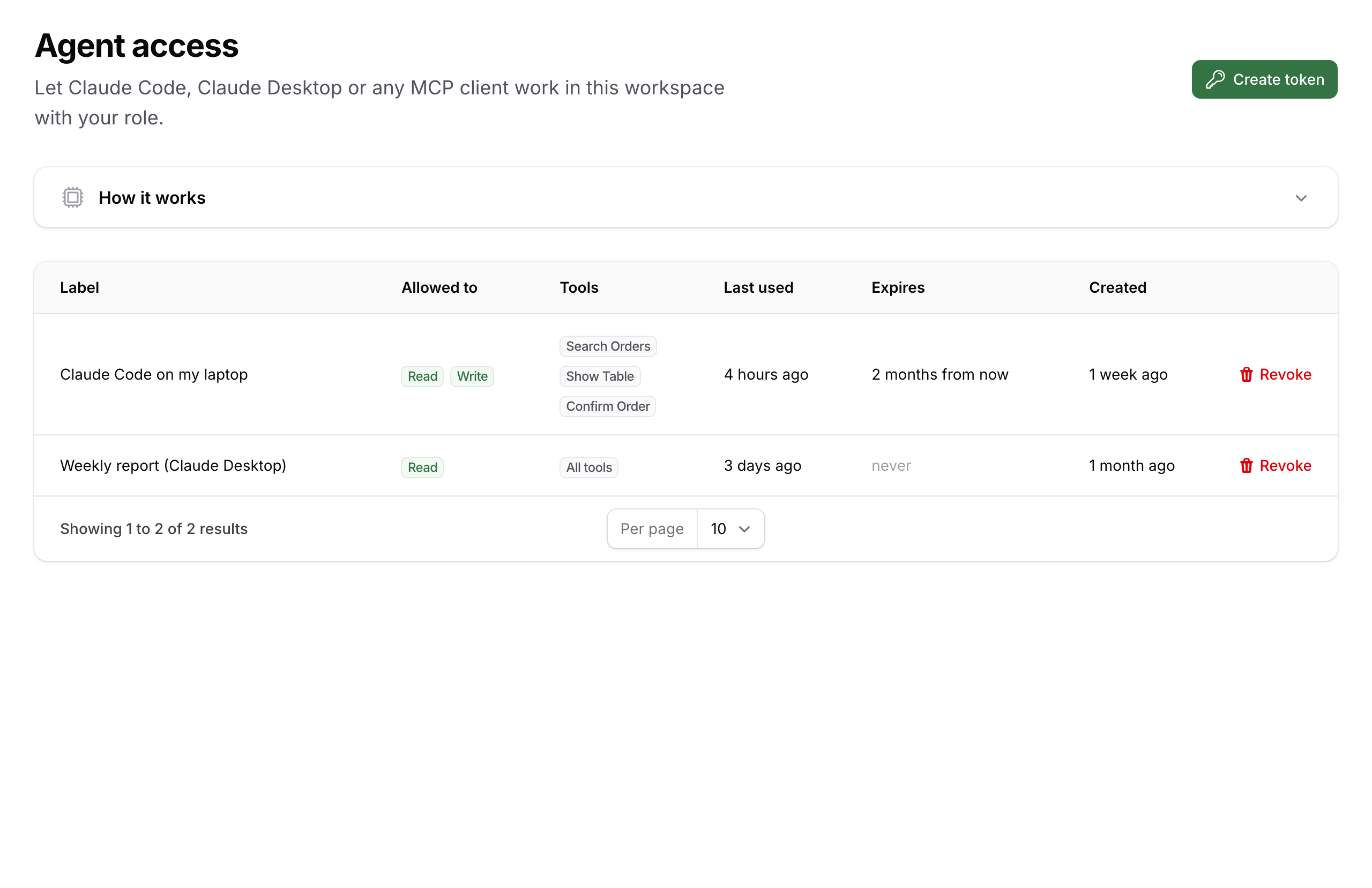
The page mints Sanctum personal access tokens for the signed-in person:
- a label ("Claude Code on my laptop");
- abilities: Read (look things up, reports) and Write (change data through the tools, still limited by the person's role);
- an optional expiry (7, 30, 90 or 365 days; Sanctum's
expires_at, so an expired token is refused byauth:sanctumlike any other); - optionally, only these tools: the modal lists the tools the person's role allows right now in one table, each with its title, a Read or Write badge and what it does (the full description on hover; write rows are switched off until Write is ticked). Ticking some stores them as
tool:{name}abilities and the token is limited to exactly those. Ticking none keeps the token at every tool the role allows; - in a panel with tenancy, the token also carries
tenant:{slug}so it only works on that workspace's URL.
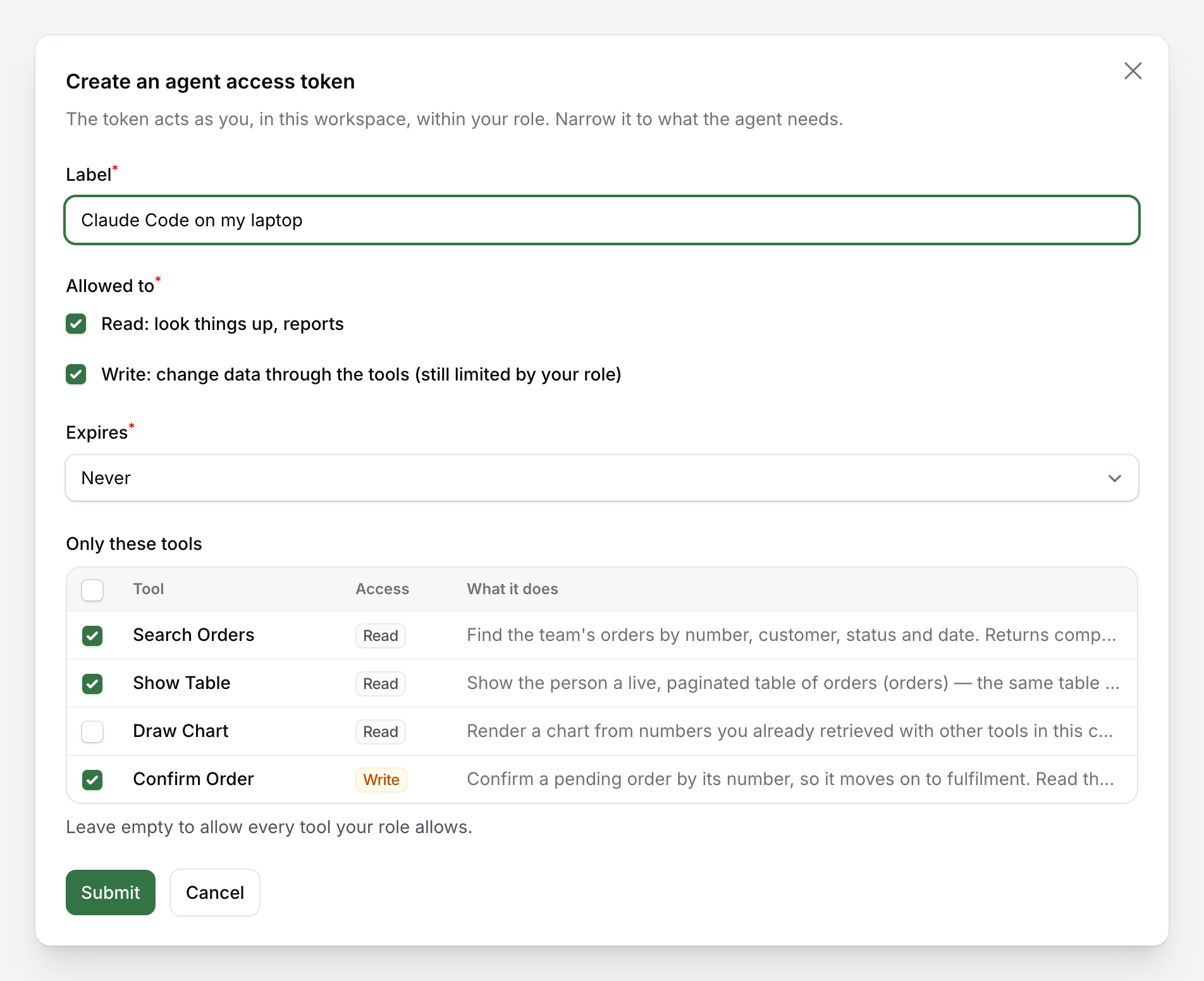
A token can only narrow what the role allows, never widen it: the picker offers only the tools the person may run, and the role is checked again on every call, so a tool the role loses later is refused even when the token names it. A typical split is one read-only token for a reporting agent and a second one scoped to confirm-order and search-orders for the agent that works the queue.
The plain token is shown once, together with the ready-made connection snippets:
claude mcp add --transport http acme https://acme.test/mcp --header "Authorization: Bearer 3|…"
{ "mcpServers": { "acme": { "type": "http", "url": "https://acme.test/mcp", "headers": { "Authorization": "Bearer 3|…" } } } }
Below, a table lists the person's tokens (label, abilities, tools, last used, expiry, created) with a Revoke action. Tokens are regular Sanctum tokens, so $user->tokens(), expires_at and Sanctum's pruning work as usual.
The endpoint
POST /mcp by default (packstub-agents.mcp.path), registered with Mcp::web() once every panel is known. The middleware stack:
'middleware' => ['throttle:60,1', 'auth:sanctum', AuthenticateAgent::class],
Ahead of that stack the package always runs AcceptJson, which makes the request one that accepts JSON: a request that fails authentication (no token, a revoked or expired one) gets a JSON 401 {"message": "Unauthenticated."} whatever Accept header the client sent, never the framework's redirect to a login route.
AuthenticateAgent puts the request into the same shape as a panel request: the assistant's panel is made current, the person's locale is applied, and, when the path carries {tenant}, the workspace is resolved and set (see Tenancy). Every tool then behaves exactly as it does in the chat.
Set AGENT_MCP_ENABLED=false to remove the route and the Agent access page.
What a client sees
tools/listreturns the tools the person's role and the token allow (each tool'sshouldRegister()checks its ability, then the token), in the order of the server's$tools, with the server's name and instructions.- A read token lists and runs read-only tools; write tools are not on its list, and calling one by name gets the protocol's "Tool [confirm-order] not found." error.
- A write token runs write tools directly with the token holder's role. There is no approval step over MCP: the client is the agent the person chose to trust, and the server's instructions tell it to read the record first when in doubt.
- A scoped token (one or more
tool:{name}abilities) lists only those tools; any other is "not found" to it, even one the role allows. - A tool the role does not allow is not listed; a direct call returns the refusal ("Your role (Viewer) is not allowed to do this.").
The token checks live in AgentTool::tokenRefusal(), which returns why the current token may not run the tool ("This access token is read-only.", "This access token does not include update-license.") or null; handle() calls it too, so a tool invoked outside the server is refused with that message. AgentTool::accessToken() gives the current personal access token (null in the chat and for Sanctum's transient session token), tokenTools($token) the names a token is limited to, tokenIsScoped($token) whether it is — useful when an app gates a tool of its own that does not extend AgentTool, or wants to show what a token may do.
Testing the endpoint
$token = $user->createToken('desk', ['read', 'write'])->plainTextToken;
// or, limited to two tools and a month:
$token = $user->createToken('queue', ['read', 'write', 'tool:search-orders', 'tool:confirm-order'], now()->addDays(30))->plainTextToken;

postJson('/mcp', ['jsonrpc' => '2.0', 'id' => 1, 'method' => 'tools/list'], [
    'Authorization' => 'Bearer '.$token,
    'Accept' => 'application/json, text/event-stream',
    'MCP-Protocol-Version' => '2025-06-18',
])->assertOk()->assertJsonPath('result.tools.0.name', 'search-orders');
See Testing for the full example.